
Smart Glasses · Guide
How to tell if someone is wearing smart glasses with a camera
Look for a small camera in the front of the frame and a light that turns on when it captures. Here is what Meta, Snap and Google say their lights do, and why a dark frame proves nothing.
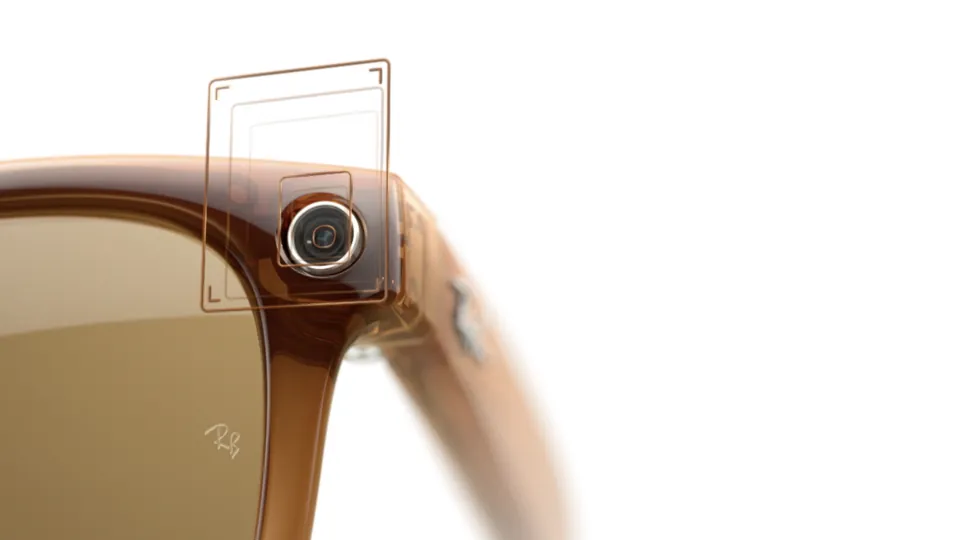
Part of our Meta Glasses guide
The most reliable sign that someone's glasses can take photos is a small camera lens in the front of the frame, and the most useful clue that they're capturing right now is a light that turns on or blinks. Meta, Snap and Google each say their glasses have such a light. It is a useful signal, but a frame with no light on proves nothing. This guide is based on Meta's help center and newsroom posts, Snap's privacy page and Google's privacy post, plus Talaya's published reporting.
What to look for on the frame
A camera lens on the front. On the first-generation Ray-Ban Meta, the camera sits in the front corner of the frame, as Meta's press photo above shows and as our recording light explainer notes. Meta describes the Oakley Meta Vanguard as having a centered 12-megapixel camera with a 122-degree wide-angle lens. Snap puts its capture LED in the center of the frames (more on that below).
A light near the camera. Meta says every pair of its AI glasses has a white light called a capture LED. Snap says SPECS have a prominent external LED in the center of the frames. Google says every pair of its glasses has an outer indicator light.
Frame styles. Meta Glasses, the line Meta launched with EssilorLuxottica, come in three styles named in Meta's announcement: Adventurer, Fury and Glasses by Kylie. Our Meta Glasses lineup guide covers each one. Snap says SPECS are meant to be recognizable, with a "distinctive design and iridescent lenses".
What we can't tell you. Meta hasn't said where the capture LED sits on Meta Glasses or on Oakley Meta HSTN in the pages we read. None of the pages we read gives temple thickness or logo placement for any model. Chunky temples or a brand mark are not dependable clues.
What the light means, by brand
| Brand | What the company says the light does | Where it says the light is |
|---|---|---|
| Meta (Ray-Ban Meta, Oakley Meta, Meta Glasses) | White capture LED blinks briefly for a photo and keeps blinking for as long as a video records | Not stated for each model |
| Snap SPECS | External LED lights up or flashes when the wearer takes a photo, records video or records audio | Center of the frames |
| Google (Android XR eyewear) | Outward-facing LED lights up when a photo or video is taken for the gallery | Not stated |
Meta
Meta says the capture LED has no off switch. It also says that starting with its second generation, the camera is automatically disabled if the company detects that the LED has been blocked, and that it is updating the glasses to disable the camera if the LED is physically tampered with or destroyed.
Meta's help center describes a second light, the notification LED near the right frame. It changes color to show power, capture, voice controls and calls, and it is separate from the capture LED. Our LED colors explainer goes through the colors.
Meta's Meta Glasses announcement says they carry the same built-in privacy safeguards as its other AI glasses, but that page doesn't name the light. The Oakley Meta Vanguard can also light a status LED in the wearer's peripheral vision. Meta's text describes that as an aid for the wearer, not a recording light.
Snap SPECS
Snap says the wearer also hears a sound when recording. Snap also says SPECS have cameras for augmented reality and understand the world without recording it, so the cameras are not recording continuously. Snap hasn't said what color the center LED is.
Google's Android XR glasses
Google's post, dated Nov. 12, 2026, says that if the indicator light is covered or tampered with, sensors are designed to detect that and prevent photos or videos from being taken. Its responsible-use rules require users to agree not to record others without permission and not to record in sensitive places. Google also says the frames have a physical power switch that turns the glasses completely off. It hasn't said what color its light is or where on the frame it sits. Our Android XR device roundup lists the frames.
Why no light doesn't settle it
A light only helps if you can see it. Hamburg's data protection office found the light hard to see outdoors and useful mainly to people close by, according to our report on how recording lights work. That piece also reports one case where Hamburg found the light did not come on while the wearer used Meta AI with the camera. Meta's own pages we read don't address that case, and Google's and Snap's text doesn't say their lights always show when the camera is used for an AI answer. We can't say whether they do. A blinking light means capture is happening, and a dark frame doesn't prove that nothing is.
If you think someone is recording you
Asking is usually the fastest route. Our bystander guide covers what you can say and do. Some places have rules of their own: New York's courts have barred glasses with cameras or microphones since July 20, according to our legal explainer, and our venue list tracks other bans. For the wider picture, start with what smart glasses are.
If you want a pair with no camera at all, see our guide to smart glasses without a camera. Model guides: Ray-Ban Meta, Oakley Meta, Snap Specs.
Frequently asked questions
Can you tell camera glasses from regular glasses at a glance?
Not always. The most reliable sign is a small camera lens in the front of the frame. None of the pages we read gives temple thickness or logo placement for any model, so we can't offer those as dependable tells.
What does a blinking white light on someone's glasses mean?
On Meta's AI glasses, Meta says the white capture LED blinks briefly for a photo and keeps blinking for as long as a video is recording.
Does no light mean the glasses are not recording?
No. The light can be hard to see in daylight or from a distance, and Hamburg's data protection office reported one case where it did not light while the wearer used Meta AI with the camera, according to our earlier reporting.
Do Snap Specs have a recording light?
Snap says a prominent external LED in the center of the frames lights up or flashes when the wearer takes a photo, records video or records audio, and that the wearer also hears a sound.
Do Google's Android XR glasses have a recording light?
Google says every pair has an outer indicator light that lights up when a photo or video goes to the gallery.
Sources
Join the conversation
Questions, or something to add? Talk about it with other smart glasses owners in r/Talaya, our community on Reddit.