Smart Glasses · Guide
How to take photos and record video on Ray-Ban Meta glasses
One press of the capture button takes a photo, and a long press starts a video. Here's how to do both by voice, how long clips can be, which quality settings to change and where the files end up.
Part of our Ray-Ban Meta guide
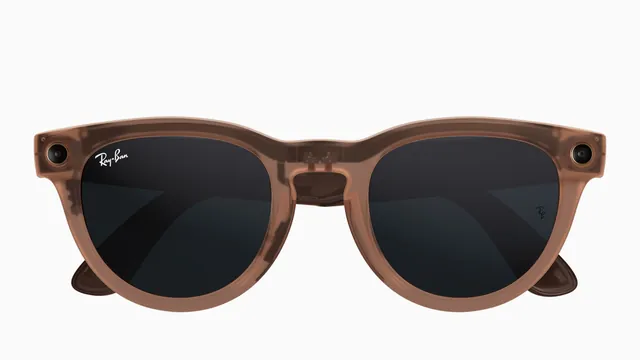
Ray-Ban Meta glasses have one button for the camera. Press the capture button once for a photo, press and hold it for a video, or skip the button and ask Meta AI. Everything you shoot is saved on the glasses until you import it to your phone.
This guide is based on the camera guides and specifications Meta publishes for its AI glasses. The capture button is in the same place on Oakley Meta HSTN and Oakley Meta Vanguard, and the voice commands are the same, according to Meta.
Take a photo
The capture button is on the right arm, near the hinge, on Ray-Ban Meta, Oakley Meta and Meta Ray-Ban Display, Meta says in its guide to shooting POV video.
- Press the capture button once.
- The white capture LED on the front of the frame blinks to confirm the shot.
To do it hands-free, say "Hey Meta, take a photo."
Ray-Ban Meta Gen 3, released Sept. 23, adds dynamic photos, which capture several frames each time so you can choose the best one, according to Meta's announcement.
Record a video
- Press and hold the capture button until the white LED lights up. Recording has started.
- Press the button again to stop. The LED turns off and the video is saved to the glasses' internal storage.
By voice, say "Hey Meta, take a video" to start and "Hey Meta, stop" to end. Meta lists a few more commands, depending on the model:
| Command | What it does | Models Meta lists |
|---|---|---|
| "Hey Meta, take a slo-mo video" | Slow motion | Meta's newest models |
| "Hey Meta, take a 3K video" | 3K Ultra HD video | Ray-Ban Meta Gen 2, Oakley Meta HSTN and Vanguard |
| "Hey Meta, start a hyperlapse" | Time-lapse | Ray-Ban Meta Gen 1 and Gen 2, Oakley Meta HSTN and Vanguard |
Gen 3 also records 3K Ultra HD video, Meta said at launch.
How long you can record
Up to 3 minutes per clip. Meta says most of its glasses can record that long, and its concerts page gives the same figure for Ray-Ban Meta Gen 2. The limit is a setting, though, and Meta's pages disagree on where it starts: the POV guide says clips stop at 30 seconds until you raise the maximum to 3 minutes in the Meta AI app, while the concerts page says Gen 2 records up to 3 minutes by default. Check the setting before you film something long. Oakley Meta Vanguard is the exception, with up to 5 minutes once you turn it on in the app.
Change the quality settings
Open the Meta AI app with your glasses connected, select your glasses and go to the video settings. These are the options Meta describes:
- Resolution: 1080p on first-generation Ray-Ban Meta. Gen 2 and Oakley Meta go up to 3K at 30 frames per second, or 1080p at 60.
- Frame rate: 30fps for everyday clips, 60fps for fast motion such as cycling or running.
- Stabilization: low, medium, high or auto, which picks a level based on how much you're moving.
- Maximum video length: up to 3 minutes on Ray-Ban Meta.
Meta's own tip is to use 3K for detailed scenery and 1080p for longer clips and social posts, since it saves battery and storage.
Where your photos and videos go
Captures are stored on the glasses, and only you can see them until you decide to share, Meta says in its privacy Q&A. Importing them in the Meta AI app moves them to your phone's photo library, where they behave like any other photo or video. Meta says auto-import is on by default on most iPhones and on Android 13 and later. Videos are saved as MP4 on Android and HEVC on iPhone.
For the step-by-step version, including what to do when an import stalls, see how to import Ray-Ban Meta photos and videos.
To share without touching your phone, link your messaging and social accounts in the Meta AI app first, then try "Hey Meta, send my last video to my Instagram Story," one of the examples Meta gives.
The capture LED
Every Ray-Ban Meta has a white capture LED on the front. It blinks briefly when you take a photo and keeps blinking for as long as you record video, and it has no off switch, according to Meta. If it's covered, the glasses tell you to clear it before recording, and since the second generation the camera is disabled while the light is blocked. Meta says it's updating the glasses to disable the camera when the LED has been tampered with, too. There's also a shutter sound, but it's mainly for you: Meta says making it audible at a distance isn't practical.
Can you live stream?
Only on first-generation Ray-Ban Meta. Meta's camera page says newer models, including Ray-Ban Meta Gen 2, Oakley Meta HSTN and Oakley Meta Vanguard, don't support live streaming.
Coming soon
At Connect in September, Meta said its glasses will record video with Dolby Atmos spatial audio and get a landscape crop mode that saves photos, videos, hyperlapses and slow-motion clips horizontally instead of vertically. Meta says Dolby Atmos capture arrives later this year; its announcement didn't give a date for landscape mode.
Frequently asked questions
How long can Ray-Ban Meta glasses record video?
Up to 3 minutes per clip on Ray-Ban Meta, according to Meta. The maximum is a setting in the Meta AI app; Meta's Oakley Meta Vanguard goes up to 5 minutes.
Can you live stream from Ray-Ban Meta glasses?
Only on the first-generation Ray-Ban Meta. Meta says newer models, including Ray-Ban Meta Gen 2, Oakley Meta HSTN and Oakley Meta Vanguard, don't support live streaming.
Do people know when I'm recording?
A white capture LED on the front blinks briefly for a photo and keeps blinking during a video, and it can't be switched off. Meta says the camera is disabled if the light is covered.
What format are Ray-Ban Meta videos?
Meta says the glasses save videos as MP4 on Android and HEVC on iPhone. HEVC takes up less storage at similar quality.
Can I take a photo without touching the glasses?
Yes. Say "Hey Meta, take a photo." To share it straight away, link your accounts in the Meta AI app and say, for example, "Hey Meta, send my last video to my Instagram Story."
Sources
- Meta: Guide to shooting POV with AI glasses
- Meta: Camera glasses, capture hands-free photos and videos
- Meta: Capturing concerts with AI glasses from Meta (April 2, 2026)
- Meta Newsroom: Meta's AI glasses, your questions answered (July 7, 2026)
- Meta Newsroom: Introducing Ray-Ban Meta Audio and more AI glasses styles (Sept. 23, 2026)
- Meta: Your personal agent coming to AI glasses (Sept. 23, 2026)
Join the conversation
Questions, or something to add? Talk about it with other smart glasses owners in r/Talaya, our community on Reddit.