Smart Glasses · Guide
Ray-Ban Meta LED lights explained: white, blinking, pulsing and the capture light
Ray-Ban Meta glasses have two lights: one inside the frame that reports to you, and one on the front that tells people nearby when you're taking a photo or video. Here's what every color and pattern means.
Part of our Ray-Ban Meta guide
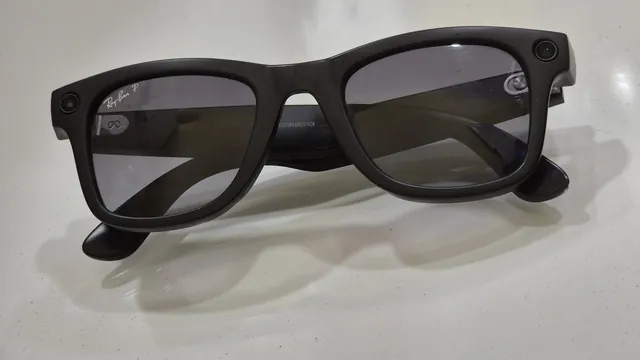
Ray-Ban Meta glasses have two lights. The notification LED sits inside the frame near the right temple, facing you, and changes color to report on power, photos and videos, voice commands and calls. The capture LED is on the front of the frame and lights up white so the people around you can tell when you're taking a photo or recording a video. Meta's help center keeps its full list of notification LED patterns inside the Meta AI app, and the FAQs that Oakley and Ray-Ban publish spell them out.
This guide is based on Meta's help center, Meta's newsroom and the support FAQs from Ray-Ban and Oakley.
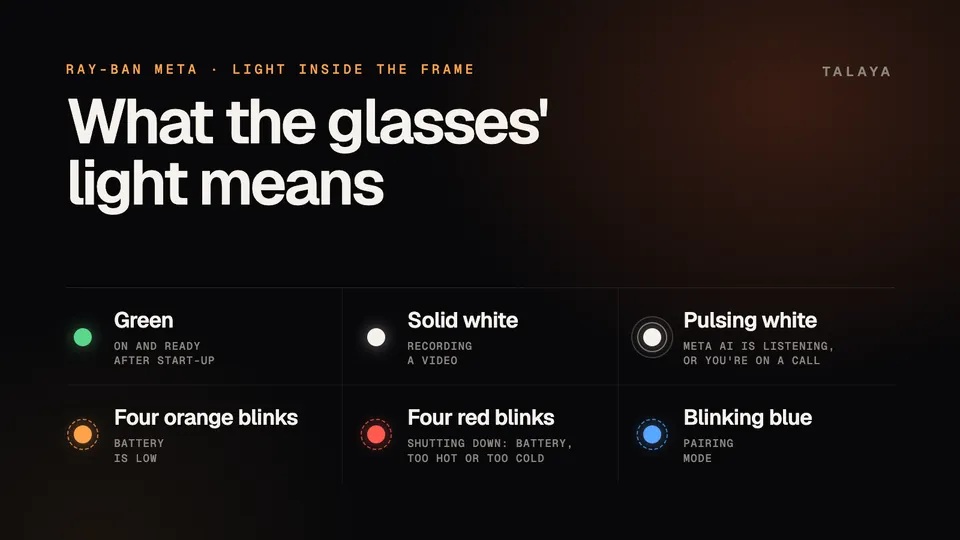
What the notification LED means
| Light | When you see it | What it means |
|---|---|---|
| White blinking, then green | After you switch the glasses on | They're starting up, which takes about 12 seconds, and then they're ready |
| A quick white blink, then green | When the glasses wake up | They're ready to use |
| One white blink | When you take a photo | The photo was taken (the capture LED blinks too) |
| Solid white | While you record | Video is recording |
| White pulsing | After you say "Hey Meta" | Meta AI is listening, or voice commands just turned on |
| White blinking | When a call comes in | Incoming call |
| White pulsing | During a call | You're connected |
| Four orange blinks | Any time | The battery is low |
| Solid orange for about three seconds | When you try to take a photo or video | Something stopped the capture |
| Four red blinks | Any time | The glasses are about to shut down: the battery ran out, or they're too hot or too cold |
| Red blinking | As you slide the switch off | The glasses are turning off |
| Blue blinking | When you start pairing | The glasses are in pairing mode |
Oakley's and Ray-Ban's FAQs describe the power, capture, voice and call patterns, and Ray-Ban's also mentions blue for pairing. Meta's power guide adds the red blink as the glasses switch off and says the light turns solid green once they're ready.
If the light keeps flashing white
White is the busiest color, and most white blinking is normal. The blinking at power-on lasts about 12 seconds before the light turns green, and Meta's microphone guide says a white blink right after you say "Hey Meta" means the glasses heard you.
The exception is pairing. If the LED keeps blinking white without stopping while you try to pair the glasses, Meta says to force restart them and then start pairing again from the Meta AI app. On Ray-Ban Meta and Oakley Meta HSTN glasses, a force restart works like this:
- Slide the power switch back to turn the glasses off.
- Press and hold the capture button.
- Keep holding it and slide the power switch forward to turn the glasses back on.
- Let go of the capture button as soon as the status LED turns red.
Meta says a force restart doesn't delete your photos or unpair the glasses, though it can take a few minutes for them to reconnect to the app.
Green, orange and red
Green is the light you want: it means the glasses are on and ready. If you never see it after switching them on, start by charging them. Our guide to Ray-Ban Meta glasses that won't turn on goes through the steps.
Orange means one of three things. Four blinks warn that the battery is low. A solid orange light for about three seconds means something prevented a photo or video. And during a factory reset, Meta says the LED turns orange after you press the capture button five times, which is expected.
You'll see red in a few situations. Four red blinks mean the glasses are about to switch themselves off because the battery ran out or they got too hot or too cold. A red blink as you slide the switch back means they're turning off. During a force restart, the red light is your cue to let go of the capture button.
Blue, and what to do if it won't turn blue
Blue means pairing mode. Ray-Ban's FAQ says the notification LED blinks blue when the glasses are ready to pair, but Meta's own instructions rely on the case light instead. Meta says the case LED starts flashing blue once the glasses are switched on and docked. If it doesn't, press and hold the button on the back of the case for at least five seconds. If the case light never turns blue, Meta's fix is a factory reset of the case. Our guide to pairing mode problems has the full sequence.
The capture LED on the front
Meta explained the front light in a July 7, 2026, post. Every pair of its AI glasses has one, and the white light blinks whenever photos or videos are being captured for your gallery: briefly for a photo, and for as long as you keep recording a video. "The capture LED has no off switch," Meta wrote. Ray-Ban's and Oakley's FAQs describe the light as solid white during video and add that it also lights up when the glasses first turn on.
Meta says the light exists so that people nearby know when they might be recorded. Starting with the second generation of its glasses, the camera is disabled if the glasses detect that the capture LED is blocked, and no photos or videos can be taken until the light is clear. Meta also said in July that it's updating the glasses to disable the camera if the LED has been physically tampered with or destroyed, and that it takes legal action against people who sell tampering services. If your camera suddenly refuses to take photos, make sure nothing is covering the capture LED.
How to change the brightness or see the full list
Meta lets you set the notification LED's brightness in the Meta AI app. Tap Glasses in the top right, then Device settings, then your glasses under Glasses, then Notification LED brightness. The options are Automatic, which uses the ambient light sensor, plus Low, Medium and High.
For Meta's own list of patterns, tap Glasses in the top right, tap See all next to Learn and explore, then tap Gestures and LEDs and Notification LED.
When to contact Meta support
If the notification LED shows nothing at all, even after the glasses have spent time in a charged case, start with the steps in our guide to glasses that won't turn on. If it keeps blinking white after a force restart and a new pairing attempt, Meta's next steps are a factory reset and then Meta Store Support, which you can reach with the Get support button at the bottom of any article in Meta's AI glasses help center.
Frequently asked questions
Can I turn off the capture LED on Ray-Ban Meta glasses?
No. Meta says the capture LED has no off switch. From the second generation on, the camera stops working if the glasses detect that the light is blocked, and Meta says it's updating the glasses to disable the camera if the LED has been tampered with.
Why is the light on my Ray-Ban Meta glasses orange?
Four orange blinks mean the battery is low, and a solid orange light for about three seconds means something stopped a photo or video, according to Ray-Ban's and Oakley's FAQs. The LED also turns orange during a factory reset.
What does a green light on Ray-Ban Meta glasses mean?
Green means the glasses are on and ready to use. After you switch them on, the LED blinks while they start up and then turns solid green, Meta says.
Can I make the light inside the frame less bright?
Yes. In the Meta AI app, open Device settings, tap your glasses, tap Notification LED brightness and choose Automatic, Low, Medium or High. Automatic uses the ambient light sensor.
Sources
- Meta Help Center: Notification LED on AI glasses (version archived Oct. 1, 2026)
- Meta Newsroom: Meta's AI Glasses: Your Questions Answered (July 7, 2026)
- Meta Help Center: How to turn AI glasses on or off
- Meta Help Center: How to restart AI glasses
- Meta Help Center: How to fix pairing issues with AI glasses
- Meta Help Center: How to pair and unpair AI glasses with the Meta AI app
- Meta Help Center: How to fix microphone issues on AI glasses
- Meta Help Center: How to factory reset AI glasses and charging case
- Meta Help Center: AI glasses support
- Oakley: Oakley Meta FAQ
- Ray-Ban: Ray-Ban Meta FAQ
Join the conversation
Questions, or something to add? Talk about it with other smart glasses owners in r/Talaya, our community on Reddit.