Smart Glasses · Guide
Ray-Ban Meta battery life: how long each generation lasts and how to stretch it
Meta rates Ray-Ban Meta glasses at up to four hours (Gen 1) to 12 hours (Audio) per charge, and the case adds up to 32 to 50 hours more. Here is what each model gets, what drains a charge faster, how long charging takes and what battery saver does.
Part of our Ray-Ban Meta guide
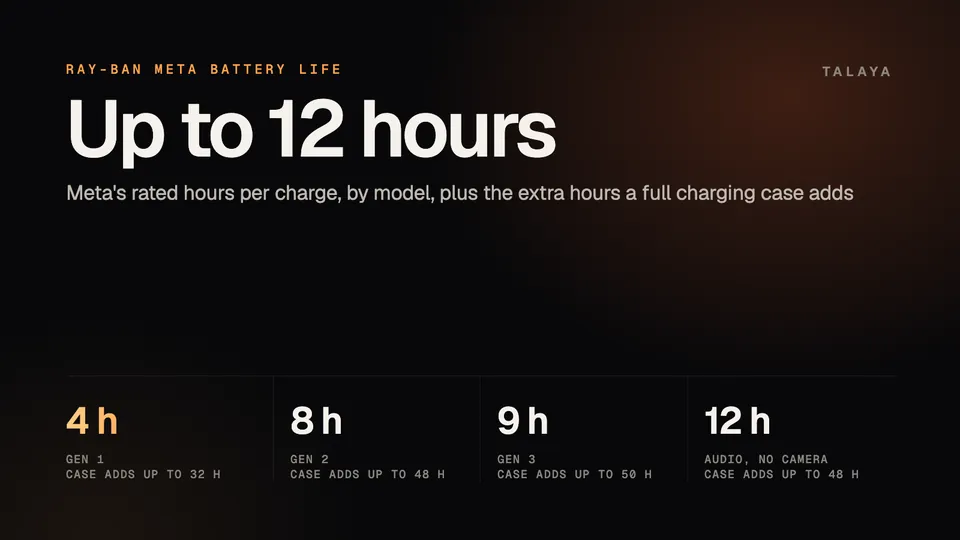
Ray-Ban Meta glasses are rated for up to four hours on a charge (Gen 1), eight hours (Gen 2), nine hours (Gen 3) or 12 hours (the camera-free Audio model), according to Meta. A full charging case adds up to 32, 48, 50 and 48 more hours. Those are best-case figures for moderate use, so continuous music, calls or video will end a charge sooner.
This guide is based on Meta's help center and announcements, EssilorLuxottica's brochures for opticians and Ray-Ban's FAQs. We haven't tested the glasses.
Battery life by model
| Model | On the glasses | Extra from a full case | Continuous audio |
|---|---|---|---|
| Ray-Ban Meta (Gen 1) | Up to 4 hours | Up to 32 hours | Up to 3.5 hours |
| Ray-Ban Meta (Gen 2) | Up to 8 hours | Up to 48 hours | Up to 5 hours |
| Ray-Ban Meta (Gen 3) | Up to 9 hours | Up to 50 hours | Not published |
| Ray-Ban Meta Audio | Up to 12 hours | Up to 48 hours | Up to 6 hours |
Meta's battery guide covers Gen 1 and Gen 2, the Sept. 23 announcement covers Gen 3 and Audio, and Meta's compare page lists the Gen 3 case. The continuous-audio column comes from EssilorLuxottica's Gen 2 brochure and Meta's Audio page.
Meta calls the main figure "moderate usage" in its battery guide and "typical use" in its Gen 2 announcement, and Ray-Ban's FAQ describes Gen 3's nine hours as mixed use. None of them says what the mix is. Meta's legal disclosures call every battery claim approximate and add that real results vary with use and settings. They also put the total with a full case at up to 36 hours for Gen 1 and 56 hours for Gen 2.
The Optics frames, Blayzer and Scriber (Gen 2), are rated for over eight hours on the glasses and 48 more from the case, with five hours of continuous audio, in EssilorLuxottica's Optics brochure. Our Gen 3 vs Gen 2 comparison covers what the extra hour buys, and the complete Ray-Ban Meta guide has the full lineup.
How long charging takes
The glasses charge only inside their case, through contacts under the nose bridge, and the case charges over USB-C. Meta lists the cable as not included. Ray-Ban's FAQ puts a full charge at about 75 minutes and a quick charge to 50% at 22 minutes. Meta says 50% takes about 20 minutes on Gen 2 and Audio, and Ray-Ban's Gen 3 page says a quick 20-minute charge in the case provides up to four additional hours.
Filling the case itself takes longer. EssilorLuxottica's Gen 2 brochure gives 3.5 hours from empty and 90 minutes to reach 50%. We found no case charging time published for Gen 3 or Audio. If a pair or a case isn't charging at all, start with our charging problems guide.
What drains a charge faster
Heavy use cuts the headline figure. Ray-Ban's FAQ lists up to five hours of continuous audio streaming and voice assistance on Gen 2, and the Gen 2 brochure adds about five and a half hours of continuous calls. Idling costs less but isn't free: the FAQ gives Gen 2 about 19 hours of standby, so on that figure a pair left switched on and unused will be flat in under a day.
Meta's battery saver page shows what Meta counts as the costly parts. The mode pauses "Hey Meta" listening, automatic volume adjustment and automatic photo and video transfers, and it caps video at one minute and 1080p at 30 frames per second. Live AI keeps the camera and microphone continuously active during a session, Meta says, and its article gives no runtime.
Temperature matters too. Meta's battery guide says that below 32°F (0°C), insulating the glasses, with a beanie, helmet or balaclava for example, can help maintain battery performance, that charging may take longer in the cold and pauses below 32°F, and that turning off auto-import can save battery in cold weather. Ray-Ban's FAQ says the notification LED blinks red four times just before the glasses shut down, whether the battery ran out or they got too hot or too cold. Ray-Ban's safety guide says to store them between 14°F and 95°F and not to leave them in a car in direct sunlight.
How to check the battery level
- The Meta AI app shows the glasses' charge on its main screen, at the top left, and in settings, according to Ray-Ban's FAQ. Dock the glasses in the case to see the case's level too.
- Ask "Hey Meta, how much battery is left?" or "Hey Meta, battery status." Our voice commands guide lists more.
- The LED on the front of the case shows a level as well. Our case lights guide explains each color and how to trigger a reading.
- The glasses also warn you themselves. The notification LED blinks orange four times when the battery is low, and Ray-Ban's FAQ lists a low-battery sound among the system sounds you can adjust in the app.
Battery saver mode
Battery saver is available on all Ray-Ban Meta glasses and on Oakley Meta HSTN and Vanguard, Meta says. Switched on at 20% battery, it can extend battery life by up to 47% (about 1.5 extra hours). Switched on at a full charge, it can extend it by up to 88% (about 7.9 extra hours).
While it's on, voice activation is paused, so tap and hold the touchpad to talk to Meta AI instead. Automatic volume adjustment and automatic photo and video transfers stop, and video is limited to one minute at 1080p and 30 frames per second. You can still take photos, make calls, play music and podcasts, and start Live AI and auto-capture by hand.
To turn it on:
- Open the Meta AI app and go to Device settings.
- Tap Battery, then turn on Battery saver.
- To have it start by itself, turn on "Turn on automatically" in the same menu. It then switches on whenever the battery falls to 20% and the glasses aren't charging.
Meta also shows a quick link in the app when the battery drops below 20%. Battery saver switches off by itself once the glasses charge to 75%.
Storing the glasses and when a battery wears out
Switch the glasses off with the power switch between uses, as our turn on and off guide shows, and keep them in the case. The 2023 edition of Ray-Ban's safety guide warns that a battery that isn't fully recharged every six months from the last use can be permanently damaged.
The battery can't be swapped. The safety guide calls it "not user replaceable" and says not to try to remove it. Meta's warranty guide lists battery issues and charging problems among the defects the warranty typically covers, and normal wear and tear among the things it doesn't. Our warranty, returns and repairs guide explains how to file a claim.
Which model lasts longest
Audio does, at up to 12 hours, and it has no camera. Among the camera models Gen 3 has the highest rating at nine hours, an hour more than Gen 2. Our Gen 3 vs Audio comparison lays out what you give up for the extra three hours.
Frequently asked questions
How long does it take to charge Ray-Ban Meta glasses?
Ray-Ban's FAQ says about 75 minutes for a full charge and 22 minutes to reach 50% in the charging case. Meta lists 50% in about 20 minutes for Gen 2 and Audio. The case itself takes about 3.5 hours to fill, according to EssilorLuxottica's Gen 2 brochure.
Can I charge Ray-Ban Meta glasses without the case?
No. Ray-Ban's FAQ says docking them in the charging case is the only way to charge them, and the case charges over USB-C with a cable Meta doesn't include. If a pair won't charge, see our charging problems guide.
How long do Ray-Ban Meta glasses last when I'm playing music?
Ray-Ban's FAQ lists up to five hours of music playback on Gen 2 and 3.5 hours on Gen 1. Meta lists up to six hours of continuous audio on Ray-Ban Meta Audio. Ray-Ban's FAQ gives Gen 3 nine hours of mixed use, and we found no continuous-playback figure for it.
Why does my Ray-Ban Meta battery drain so fast?
Continuous audio, calls, video and Live AI all use more power than idling, and heat or cold can cut a charge short. Battery saver mode helps. If a full charge suddenly lasts far less than it used to, Meta's warranty guide lists battery issues among the problems the warranty typically covers.
Can I replace the battery in Ray-Ban Meta glasses?
No. Ray-Ban's safety guide says the glasses contain a lithium-ion battery that is "not user replaceable," and its FAQ says it isn't possible to replace the embedded battery in the glasses or the case. A battery that no longer holds a charge is a support or warranty matter.
Sources
- Meta Help Center: Battery life on AI glasses (archived copy of June 8, 2026)
- Meta Help Center: How to use battery saver mode for Meta AI glasses (archived copy of July 24, 2026)
- Meta Help Center: How to use live AI on AI glasses (archived copy of June 9, 2026)
- Meta Help Center: How to file a warranty claim for AI glasses (archived copy of June 6, 2026)
- Meta: Ray-Ban Meta (Gen 2) Now With Up to 2X the Battery Life (Sept. 17, 2025)
- Meta: Introducing Ray-Ban Meta Audio and More AI Glasses Styles (Sept. 23, 2026)
- Meta Store: Compare AI glasses
- Meta Store: Ray-Ban Meta (Gen 3) and Ray-Ban Meta Audio styles and FAQ
- Meta: Ray-Ban Meta legal disclosures (battery)
- Ray-Ban: Ray-Ban Meta FAQ, US (archived copy of Nov. 14, 2025)
- Ray-Ban: Ray-Ban Meta FAQ, India store (Gen 3 battery figures)
- Ray-Ban: Ray-Ban Meta (Gen 3) Wayfarer product page, India store
- EssilorLuxottica: Ray-Ban Meta (Gen 2) brochure for eye care professionals (March 2026)
- EssilorLuxottica: Ray-Ban Meta Optics brochure for eye care professionals (March 2026)
- Ray-Ban: Ray-Ban Meta safety and warranty guide (2023 edition)
Join the conversation
Questions, or something to add? Talk about it with other smart glasses owners in r/Talaya, our community on Reddit.