Smart Glasses · Guide
How to use Meta AI on Ray-Ban Meta glasses: voice commands that work
"Hey Meta" is only the start. Here's how to wake Meta AI on your Ray-Ban Meta glasses, ask about what you're looking at, and the commands for photos, calls, music, reminders and translation.

Part of our Ray-Ban Meta guide
Meta AI is the assistant built into Ray-Ban Meta glasses. You talk to it, it answers through the speakers in the frame, and because the glasses have a camera, it can answer questions about whatever you're looking at. It's also how you control most of the glasses without touching them.
This guide is based on the guides Meta publishes for its AI glasses and on Ray-Ban's support FAQ. Oakley Meta and Meta Glasses come with the same built-in Meta AI and the same "Hey Meta" wake phrase, according to Meta.
How to wake Meta AI
Meta describes voice control as two steps: wake the assistant, then say what you want. There are several ways to do the first part, according to Meta's hands-free guide:
- Say "Hey Meta." This works whenever the glasses are on and voice control is enabled in the Meta AI app.
- Tap the frame, or tap and hold the touchpad on the right arm to start a conversation.
- Press the action button on Ray-Ban Meta Gen 3. Meta added the customizable button for "instant access to Meta AI," according to its launch announcement.
When Meta AI is listening, the notification LED inside the frame pulses white, Ray-Ban says in its support FAQ. If you want a sound as well, turn on the wake sound in the voice settings of the Meta AI app. The same settings page is where you check that Meta AI and "Hey Meta" are switched on if the glasses stop responding.
Ask about what you see
The camera sees what you see, so Meta AI can combine your question with the view in front of you. Meta's examples include:
- "Hey Meta, what am I looking at?" for a landmark you're walking past.
- "Hey Meta, which artist painted this?" in a museum.
- "Hey Meta, what can I make with this?" while looking at the ingredients on your counter, then "Hey Meta, walk me through the steps."
- "Hey Meta, what does this text say?" for a sign or a menu in another language.
Meta AI keeps the context, so you can follow up, for example by asking why a building you just asked about is important. At Connect, Meta said richer descriptions of what you're looking at are coming, shaped by feedback from blind and low-vision users.
Voice commands by task
| Task | Try saying |
|---|---|
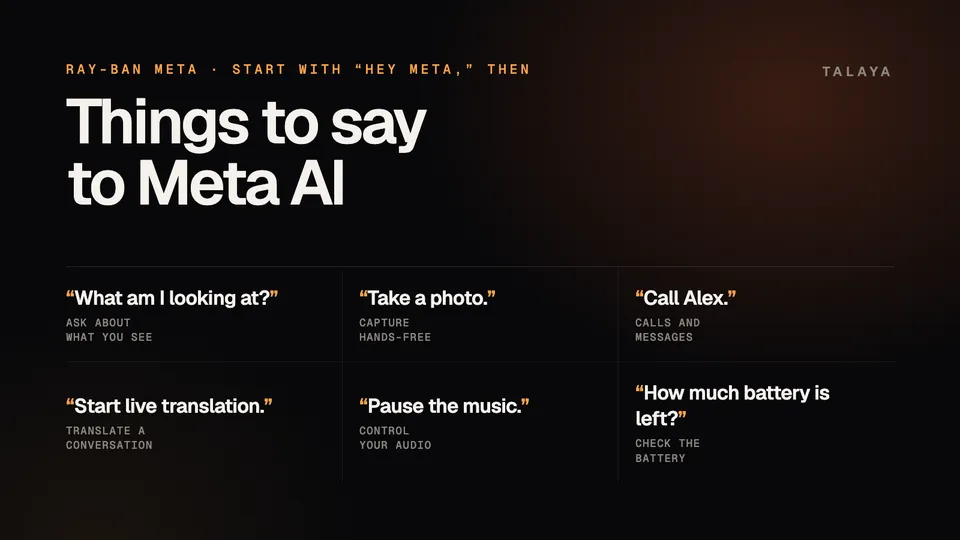
| Take a photo | "Hey Meta, take a photo." |
| Record video | "Hey Meta, take a video." Then "Hey Meta, stop." |
| Call someone | "Hey Meta, call Alex." |
| Send a message | "Hey Meta, send a message to" plus a name |
| Share a clip | "Hey Meta, send my last video to my Instagram Story." |
| Play music or a podcast | "Hey Meta, play" plus a song, artist or podcast |
| Pause | "Hey Meta, pause the music." |
| Set a reminder | "Hey Meta, remind me to buy merch in an hour." |
| Translate a conversation | "Hey Meta, start live translation." |
| Get walking directions | "Hey Meta, direct me to" plus a place |
| Check the battery | "Hey Meta, how much battery is left?" |
The examples come from Meta's own guides, including those for shooting video and concerts, and from Ray-Ban's FAQ. Walking directions are in beta and available only in selected cities, Meta says. Calls, messages and music need the matching apps connected in the Meta AI app first; our guides to calls and messages and music and podcasts explain how.
Stop or interrupt Meta AI
To end a long answer or a notification being read out, Ray-Ban's FAQ says to tap and hold the touchpad. For recordings, say "Hey Meta, stop," and for translation, "Hey Meta, stop live translation."
If Meta AI doesn't respond
Ray-Ban suggests these checks, in order:
- Make sure the glasses are on and charged.
- In the Meta AI app, open the voice settings for your glasses and check that Voice and "Hey Meta" are on.
- Try again somewhere quieter, since background noise can interfere.
- If it still doesn't work, the app has a microphone troubleshooting setting that adjusts how the microphones pick up your voice.
What's coming
Meta said at Connect that Muse, its personal AI agent, is coming to its AI glasses "in the coming months," and that you'll call it by saying its name. It will be able to act on what you're looking at, such as a product on a shelf. Meta also plans to let you change what a press and hold on the touchpad does, so it can launch a feature like a call or an app, according to its Connect blog post. Our explainer covers what Muse will do on your glasses.
Frequently asked questions
Do I have to say "Hey Meta" every time?
No. You can also wake Meta AI by tapping the frame or by tapping and holding the touchpad, according to Meta. Ray-Ban Meta Gen 3 adds an action button for instant access.
How do I know Meta AI is listening?
Ray-Ban's support FAQ says the notification LED on the inside of the frame pulses white when Meta AI is listening. You can also turn on a wake sound in the Meta AI app.
Why isn't "Hey Meta" working?
Check that your glasses are on and charged, and that Meta AI and "Hey Meta" are turned on in the voice settings of the Meta AI app. Loud background noise can also get in the way.
Can Ray-Ban Meta tell me what I'm looking at?
Yes. Look at it and ask, for example, "Hey Meta, what am I looking at?" Meta AI uses the camera to answer, and you can ask follow-up questions.
Is Muse coming to Ray-Ban Meta?
Meta says Muse, its personal AI agent, is coming to its AI glasses "in the coming months." It hasn't said which models get it first.
Sources
- Meta: Hands-free calling and messaging on AI glasses
- Meta: Discover the world with multimodal AI glasses
- Meta: AI glasses with real-time translation
- Meta: Capturing concerts with AI glasses from Meta (April 2, 2026)
- Meta: Guide to shooting POV with AI glasses
- Meta Newsroom: Introducing Ray-Ban Meta Audio and more AI glasses styles (Sept. 23, 2026)
- Meta Newsroom: The biggest news from Connect 2026 (Sept. 24, 2026)
- Meta: Your personal agent coming to AI glasses (Sept. 23, 2026)
- Ray-Ban: Ray-Ban Meta FAQ (India store)
Join the conversation
Questions, or something to add? Talk about it with other smart glasses owners in r/Talaya, our community on Reddit.