Smart Glasses · Guide
Ray-Ban Meta touchpad controls: every gesture, button and how to customize them
Taps and swipes on the right arm control music, calls and Meta AI, and the capture button handles the camera. Here's what each gesture does, how the Gen 3 action button works and what you can change.
Part of our Ray-Ban Meta guide
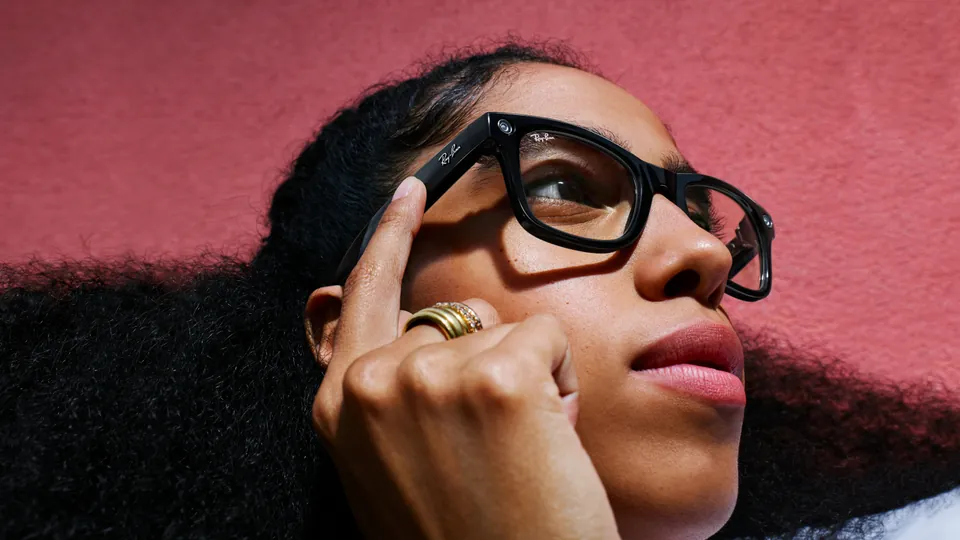
Ray-Ban Meta glasses have no screen, so you control them with your voice or with a few physical controls on the frame: a touchpad on the right arm, a capture button for the camera and a power switch on the left arm. Ray-Ban Meta Gen 3 and the Optics frames add a fourth, the action button.
This guide is based on Meta's help center and published specifications, with the gesture list from Ray-Ban's support FAQ.
Where the controls are
| Control | Where it is | What it's for |
|---|---|---|
| Touchpad | Right arm (Meta and Ray-Ban call it the right temple) | Music, volume, calls, Meta AI |
| Capture button | Right arm, near the hinge | Photos and video |
| Power switch | Left arm | Turning the glasses on and off |
| Action button | Ray-Ban Meta Gen 3 and the Optics frames | An action you choose in the app |
Meta gives the capture button's position in its POV guide and the power switch's in its pairing article.
Touchpad gestures
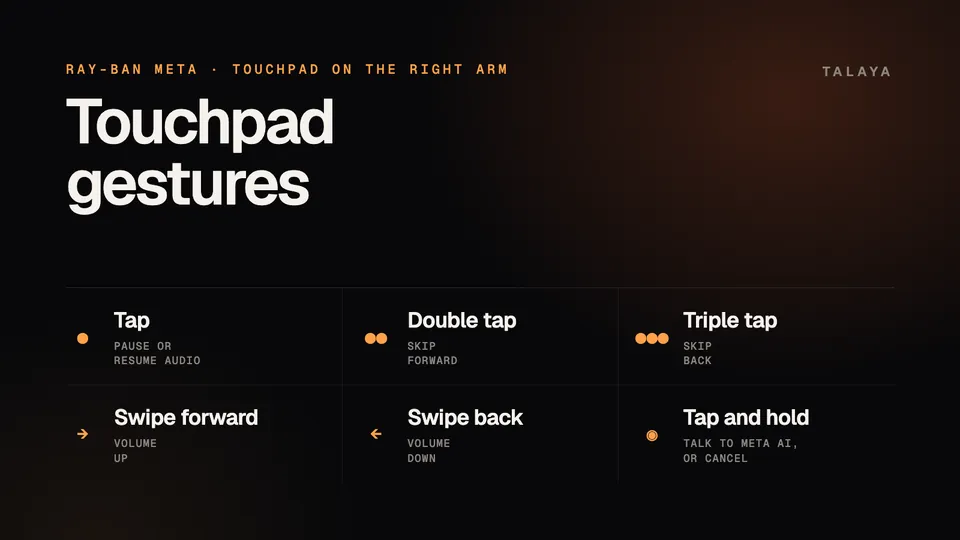
Ray-Ban's US support FAQ lists the playback and volume gestures, and Meta and Ray-Ban describe what tap and hold does:
| Gesture | What it does |
|---|---|
| Tap once | Pause or resume audio |
| Double tap | Skip forward |
| Triple tap | Skip back |
| Swipe forward | Turn the volume up |
| Swipe back | Turn the volume down |
| Tap and hold | Start talking to Meta AI, or cancel a response or an incoming notification |
Meta's hands-free guide says tapping and holding the touchpad starts a conversation with Meta AI, and that you can also wake the assistant by tapping the frame or saying "Hey Meta." Ray-Ban's FAQ for India adds that tap and hold cancels or exits any assistant response or incoming notification, which is handy when Meta AI starts reading out a long answer.
The capture button
- Press once to take a photo.
- Press and hold until the white LED lights up to start recording video. Press again to stop.
- Hold for 12 seconds with the glasses on to put them into Bluetooth pairing mode, a step Meta describes in its Bluetooth FAQ. Ray-Ban says to fold both arms first.
You can do the same with your voice: "Hey Meta, take a photo" or "Hey Meta, take a video." Our photo and video guide covers clip length and quality settings.
The power switch
Slide the switch on the left arm toward the front of the glasses to turn them on, and back to turn them off. Our guide to turning Ray-Ban Meta on and off explains what the lights mean and how to restart a frozen pair.
The Gen 3 action button
Ray-Ban Meta Gen 3, released Sept. 23, has a customizable action button that Meta introduced for "instant access to Meta AI," according to its launch announcement. The prescription-first Optics frames, launched in March, have one too. You can assign it something else. Ray-Ban's FAQ gives these steps:
- In the Meta AI app, tap the glasses icon.
- If you have more than one device paired, swipe to select your Gen 3 glasses.
- Tap Settings, then Customize controls.
- Tap Action button and choose the action you want.
Some actions, such as live translation or quick connect, may need extra setup before the button works. You can change the assignment again at any time.
Customizing the touchpad
You can change what tap and hold does. Ray-Ban suggests setting it to do nothing if you often wear the glasses with a hat, a helmet or wet hair, because those can register as taps on the touch sensor. That stops the glasses from waking Meta AI by accident.
At Connect, Meta said more control is on the way: you'll be able to set the touchpad's press and hold to launch a key feature right away, such as placing a call or opening an app.
When taps don't register
If the touchpad or capture button stops responding, Ray-Ban points to wear detection, the sensor that tells when you're wearing the glasses. A loose fit can confuse it. Ray-Ban's steps:
- Take the glasses off and put them back on.
- Turn the glasses off and on again.
- If that doesn't work, turn off wear detection in the Meta AI app. The glasses will then act as if you're wearing them whenever they're on with the arms open, but features like automatic pause and resume for music stop working.
Frequently asked questions
How do I turn up the volume on Ray-Ban Meta glasses?
Swipe forward on the touchpad on the right arm to turn the volume up, and swipe back to turn it down. You can also ask Meta AI to change the volume.
How do I skip a song with Ray-Ban Meta?
Double tap the touchpad to skip forward and triple tap to go back. A single tap pauses and resumes.
What does the action button do on Ray-Ban Meta Gen 3?
It's customizable. Meta introduced it for instant access to Meta AI, and you can assign a different action in the Meta AI app under Settings, Customize controls, Action button.
Why do my Ray-Ban Meta glasses register taps I didn't make?
Ray-Ban says wet hair, helmets, hats and other head accessories can sometimes trigger the touch sensor. If it happens often, you can set the tap and hold gesture to do nothing.
Can I change what the touchpad does?
Partly. You can remap the tap and hold gesture today, according to Ray-Ban, and Meta announced at Connect that you'll be able to set press and hold to launch a feature like a call or an app.
Sources
- Ray-Ban: Ray-Ban Meta FAQ, US store (archived Nov. 14, 2025)
- Ray-Ban: Ray-Ban Meta FAQ (India store)
- Meta: Hands-free calling and messaging on AI glasses
- Meta: Guide to shooting POV with AI glasses
- Meta Help Center: How to pair and unpair AI glasses with the Meta AI app
- Meta Newsroom: Introducing Ray-Ban Meta Audio and more AI glasses styles (Sept. 23, 2026)
- Meta: Your personal agent coming to AI glasses (Sept. 23, 2026)
- Meta: Bluetooth glasses, style meets connectivity
Join the conversation
Questions, or something to add? Talk about it with other smart glasses owners in r/Talaya, our community on Reddit.