Smart Glasses · Guide
Ray-Ban Meta on iPhone vs Android: what works the same and what differs
Ray-Ban Meta glasses use the same Meta AI app on iPhone and Android. Meta and Ray-Ban document only a handful of differences, from video formats to pairing steps. Here they are, along with what the two companies don't say, including how texts and iMessage are handled.
Part of our Ray-Ban Meta guide
Ray-Ban Meta glasses work with both iPhone and Android through the same free Meta AI app, and Meta's setup, calling and messaging articles cover both phones. The differences Meta and Ray-Ban document are few: video file formats, a pairing step, two import prompts and a handful of notes on messaging and music.
This guide is based on Meta's help center, release notes and POV guide, and on Ray-Ban's FAQs. The US FAQ is an archived copy from Nov. 14, 2025, before Gen 3 launched, and the India store FAQ was current on Oct. 25, 2026.
Setup and phone requirements
Setup is the same on both phones. Install Meta AI from the App Store or Google Play, sign in with a Meta account, turn on Bluetooth and add the glasses in the app, as Meta's setup article describes. Our setup guide has the steps. Ray-Ban's FAQ gives the phone requirement as "Android 10 and above (with location services enabled) or iOS 14.4 and above."
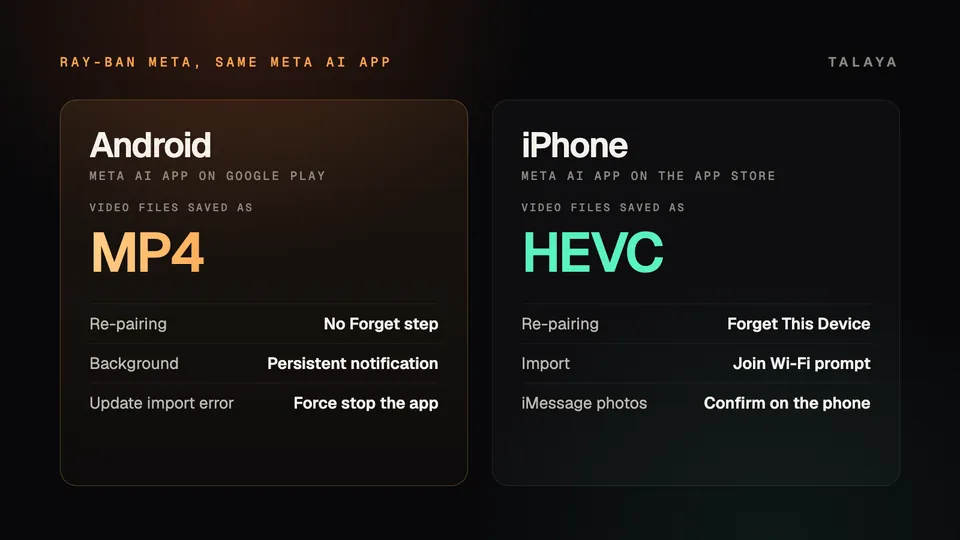
One step differs when you re-pair. If the glasses already appear in your phone's Bluetooth list, the FAQ tells iPhone owners to tap the info icon next to them and choose Forget This Device, and says Android owners can skip that step. Meta says location permission is needed to connect to the glasses over Wi-Fi, for media import and updates, on "certain Android versions and iOS mobile devices."
Calls and messages
Meta lists the same four options for both: WhatsApp, Messenger, Instagram and "your iPhone or Android phone." To connect one, tap Glasses, Device settings, Communication, then Connect next to the provider. Connecting your phone asks for access to your contacts. Meta says phone numbers and contact history stay on your devices, carrier charges may apply, a dual SIM phone uses its default SIM and emergency calls must start from the phone. Our calls and messages guide covers the commands.
Meta's article doesn't mention iMessage, SMS or Apple's Messages app by name, and neither company says whether a text sent from the glasses on an iPhone goes out as an iMessage or an SMS. Ray-Ban's FAQ has one iMessage note, about photos. When you ask the glasses to send a photo to your phone, "for iPhone's iMessage, you will still need to go to your phone to confirm sending." It gives no matching note for Android.
For video calls that share your view, Ray-Ban's FAQ has Android advice only. If the connection is poor, turn on Wi-Fi and turn off the phone's VPN and hotspot. It also lists a known issue on Pixel phones running Android 14, where sharing your view may lag or disconnect, and suggests locking the phone.
Notifications read aloud
Ray-Ban's FAQ says the glasses can announce who is calling or messaging you, and read messages out, for Messenger, WhatsApp and "your iPhone or Android phone." The toggles are Announce messages and Automatic message read out, under Communication in the Meta AI app. Meta's release notes added a "Hey Meta, read it" command in May 2024 for hearing a message after the announcement. Meta's own article on announcements wasn't available in an archived copy, so these details come from Ray-Ban's FAQ.
On iPhone, the FAQ warns that if you also use Siri's call announcements you may hear both, one from Siri and one from Meta, and that Messenger and WhatsApp calls may sometimes be announced as iPhone calls. You can turn off Siri's announcements in iPhone settings or the glasses' announcements in the app. On either phone, if you can't hear announcements, check that Bluetooth permission is on in the phone's Messenger app settings. The FAQ gives the iPhone route (Settings, Privacy, Bluetooth, Messenger) and no Android one.
Music
Anything your phone plays comes through the glasses over Bluetooth on either phone. For voice control, Apple Music is iPhone only, according to Meta's list in our music guide, which has the full list of services. Ray-Ban's FAQ adds two Android notes. Spotify Tap, the tap-and-hold shortcut for Spotify recommendations, "only works with users on Android OS 13.0 or higher and July 2023 security patch," and the FAQ gives no iOS version. For call or music trouble on Android, it says to check in Bluetooth settings that the glasses are connected for both calls and audio.
The Meta AI app and your photos
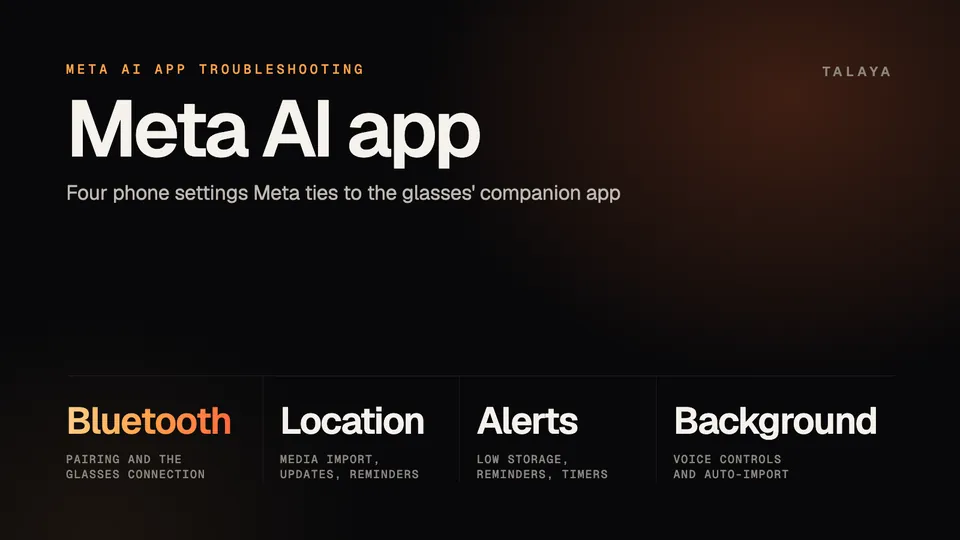
Both phones need the same four app permissions, which our Meta AI app guide covers.
Android has two documented quirks. The system shows a persistent notification while the app runs in the background, which Meta says you can swipe away without stopping the app. On older Android versions that can't dismiss it, turning off Auto-import media removes it. And if an import fails with an error that media can't be imported while the glasses update, Meta says to force stop the app in the phone's settings. iPhone owners see a "Meta AI wants to Join Wi-Fi network" prompt when they import media. Meta's June 29, 2026 release notes say Early Access members can remove it by turning on Wi-Fi Aware under Early Access in Device settings.
Meta's POV guide says videos save as MP4 on Android and HEVC on iOS, and that HEVC is more efficient, using less storage at the same quality. It also says most Android (13+) and iOS phones have auto-import on by default. Ray-Ban's older FAQ, from Nov. 2025, differs: it says only Android 13 and later default to on, and it gives steps for switching it on for other Android versions and for iOS. If your captures don't import on their own, check Auto-import media under Device settings, Media, and see our import guide.
What the sources document
| Area | Android | iPhone |
|---|---|---|
| Phone software (Ray-Ban's FAQ) | Android 10 or later, location services on | iOS 14.4 or later |
| Re-pairing | No Forget step | Forget This Device in Bluetooth settings |
| Video files (Meta) | MP4 | HEVC |
| Import | Persistent notification, force stop fix | Join Wi-Fi network prompt, Wi-Fi Aware in Early Access |
| Photo sent to your phone's messages | Not documented | Confirm sending on the phone |
| Call announcements | Not documented | Siri may announce too |
| Apple Music voice control | Not listed | Listed |
| Spotify Tap | Android 13 or later, July 2023 patch | No version given |
| Shared-view video calls | Wi-Fi on, VPN and hotspot off | Nothing listed |
In the pages we read, neither company compares the two phones feature by feature. Apart from the items above, they name nothing as exclusive to one phone, and Meta says battery saver is available in the app on both iOS and Android. Our countries guide lists the features limited by country or language.
Frequently asked questions
Do Ray-Ban Meta glasses work with iPhone?
Yes. The Meta AI app is on the App Store and Google Play, and Ray-Ban's FAQ lists iOS 14.4 or later for iPhone and Android 10 or later with location services on for Android. Our setup guide has the steps.
Do Ray-Ban Meta glasses work with iMessage?
Meta says calls and texts go through your iPhone or Android phone and never names iMessage. Ray-Ban's FAQ says that when you ask the glasses to send a photo to your phone, you still need to go to the iPhone to confirm sending for iMessage. Neither company says whether texts from the glasses go out as iMessage or SMS.
Can Ray-Ban Meta glasses read my text messages aloud?
Yes. Ray-Ban's FAQ says the glasses can announce who is messaging you and read messages out for Messenger, WhatsApp and your iPhone or Android phone, using the Announce messages and Automatic message read out toggles under Communication. Messenger's vanish mode blocks it.
Why does my iPhone ask me to join a Wi-Fi network when I import photos?
Meta's release notes say iPhone users see a "Meta AI wants to Join Wi-Fi network" prompt when importing media. Members of Meta's Early Access program can remove it by turning on Wi-Fi Aware under Early Access in Device settings.
Do I need Android 13 to use Ray-Ban Meta glasses?
No. Ray-Ban's FAQ lists Android 10 or later. Android 13 matters for two features: Meta says most Android 13 and later phones have auto-import on by default, and Ray-Ban's FAQ says Spotify Tap needs Android 13 or later.
Sources
- Meta Help Center: Call and message using AI glasses (archived copy of June 9, 2026)
- Meta Help Center: How to set up AI glasses (archived copy of April 20, 2026)
- Meta Help Center: Meta AI mobile app and location services on Android and iOS devices (archived copy of June 6, 2026)
- Meta Help Center: How to dismiss a persistent notification for the Meta AI mobile app on Android (archived copy of June 18, 2026)
- Meta Help Center: Can't import media while AI glasses are updating on Android (archived copy of April 19, 2026)
- Meta Help Center: How to use battery saver mode for Meta AI glasses (archived copy of July 24, 2026)
- Meta Help Center: AI glasses release notes (archived copy of Sept. 21, 2026)
- Meta: Guide to shooting POV with AI glasses
- Ray-Ban: Ray-Ban Meta FAQ, US (archived copy of Nov. 14, 2025)
- Ray-Ban: Ray-Ban Meta FAQ, India store (page as of Oct. 25, 2026)
Join the conversation
Questions, or something to add? Talk about it with other smart glasses owners in r/Talaya, our community on Reddit.