Smart Glasses · Guide
Meta Ray-Ban Display apps and features: what Meta documents and what each needs
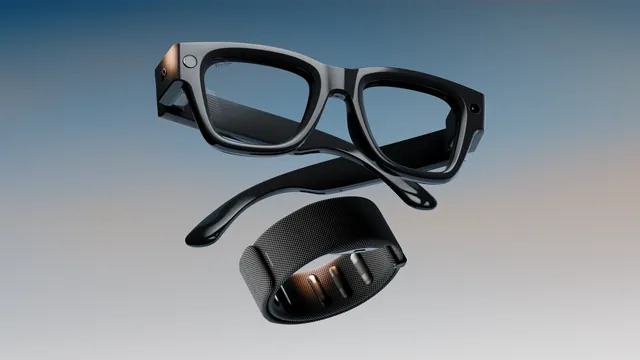
Meta Ray-Ban Display puts messaging, video calls, navigation, captions, music, Instagram and more on a small display in the right lens. Here is every app and feature Meta documents as of Oct. 26, 2026, what each needs and what's still coming.
Part of our Meta Ray-Ban Display guide
Meta Ray-Ban Display has built-in apps for messaging, calls, Meta AI, the camera, music, maps, captions and translation, a calendar and a teleprompter, and it can show Instagram Reels and Threads and play games such as 2048 and GOAT. Meta's release notes show new features arriving in January, March, April and May 2026, and its newsroom and blog added more in July and September. Several features are limited to English or the US. Third-party apps aren't in a public list yet: Meta has two developer previews and says an on-glasses app called Explore is coming soon.
This guide is based on Meta's help center release notes and newsroom post (read Oct. 26, 2026) and on our guides to the Display, and we haven't tested the glasses.
The apps and features at a glance
Meta dates its release notes by the week a rollout began. Where a note names a country or language, the table says so. Otherwise Meta names none, and the glasses are sold in the US, UK, Canada, France, Italy and Germany. Early Access is Meta's program for getting features before everyone else, and you join it in the Meta AI app.
| Feature | What it does | Needs and status, per Meta |
|---|---|---|
| Messages | Read and reply on WhatsApp, Messenger, Instagram and your phone's texts, with up to 30 WhatsApp threads | Apps connected in the Meta AI app. The 30-thread limit came with the January 2026 update |
| Contact search | Find and message a contact by dictating a name | Handwriting search is Early Access. Added April 2026 |
| Neural handwriting | Write replies by tracing letters with a finger on any surface | Needs the Neural Band. Open to everyone for Instagram, WhatsApp, Messenger and phone message notifications since May 2026, after Early Access tests that began in January |
| Video calls | WhatsApp and Messenger video calls that show the other person what you see, plus WhatsApp group video calls with the glasses' camera | The app connected. Group calls came in May 2026. Our video call guide has the steps |
| Hologram | A digital version of your face, driven by your voice, for calls | Early Access on WhatsApp for Display owners in the US, "later this fall." You make it with a self-capture in the Meta AI app |
| Call captions | Real-time captions of phone, WhatsApp, Messenger and Instagram Direct calls | English for phone calls, and Meta says processing happens on-device. Phone calls March 2026, the apps May 2026 |
| Live captions and translation | Captions of speech directed at you, and translation in conversation | Languages downloaded in the Meta AI app. Meta says translation covers 20 languages and doesn't name them. Our captions and translation guide has the steps |
| Meta AI | Answers and step-by-step instructions on the display, and a home view of your recent conversations | Muse Spark models in the US since July 2026. Writing to Meta AI by handwriting is Early Access in the US and Canada. The home view came in May 2026 |
| Camera | A live viewfinder with zoom and a preview before you share | Built in, with a 12MP camera |
| Display recording | Records the display and the point-of-view video together in one clip | English, US. Added May 2026 |
| Music | A music card for Spotify, Amazon Music, Apple Music and Shazam, Spotify playlist browsing, and a Spotify song to match what you see | Each service connected in the Meta AI app. Apple Music is iPhone only, and playlist browsing and the match feature are English. Spotify features came in March 2026 |
| Audible | Audiobook progress on the display and "Hey Meta, play [book name] on Audible" | English, with an Audible account linked in the Meta AI app. Added April 2026 |
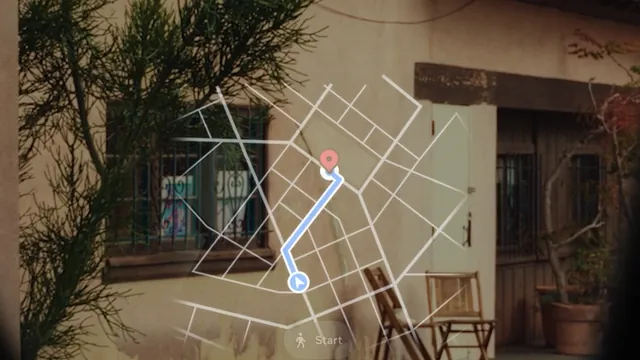
| Walking directions | Turn-by-turn directions with a map, and saved home and work addresses | Throughout the US and in cities such as London, Paris and Rome since May 2026, Meta says. Driving isn't supported. Our navigation guide has the steps |
| Cycling and transit | Cycling directions and live transit departures by voice | US and Canada. Announced Sept. 23, 2026 for "later this month" |
| Calendar and widgets | A calendar app and widgets for calendar, reminders, weather and stocks, plus seeing attendees, accepting or declining invites and joining meetings | Google Calendar or Outlook linked in the Meta AI app. The meeting features are English in the US. Calendar March 2026, meeting features Sept. 2026 |
| Timers | A hands-free timer with a countdown on the display | Added May 2026 |
| Teleprompter | Shows text so you can speak to an audience while keeping eye contact | Rolling out since January 2026 |
| Watch, like, save and share Reels, and switch between Reels and messages | Reels came in March 2026 and a top navigation bar in May | |
| Threads | Follow curated Community Feeds and repost | Added July 2026. Community Feeds were described on Sept. 23, 2026 |
| Be My Eyes | Hands-free help from a sighted volunteer | Account linked in the Meta AI app. Added April 2026 |
| Games | 2048 and GOAT | Played with the Neural Band. Added March 2026 |
Messages and calls
Messaging covers WhatsApp, Messenger, Instagram and your phone's texts. Meta's release notes added contact search by voice in April 2026, and neural handwriting now works for replies on Instagram, WhatsApp, Messenger and phone message notifications. Video calls on WhatsApp and Messenger show the other person what the glasses see, and the May 2026 notes add WhatsApp group video calls and captions on calls. Hologram is the calling feature still waiting. Meta announced it on Sept. 23 and says Early Access starts in the US "later this fall." Our Neural Band explainer lists the gestures and handwriting rules.
Meta AI, camera and captions
Meta AI can show answers and step-by-step instructions on the display, and a home view lists your recent conversations. In the US it runs on Meta's Muse Spark models, and Early Access users in the US and Canada can write to it with the Neural Band instead of speaking. The camera has a live viewfinder with zoom, and display recording saves the screen and your point of view in one clip. Live captions show speech directed at you. For languages and offline limits, see our captions and translation guide.
Music, maps and everyday tools
The music card shows album art and controls, and Spotify adds playlist shortcuts under the player and can play a song that matches what you're looking at. Audible shows your place in a book. Maps shows a mini-map with turns, and Meta's May 2026 notes say walking directions work throughout the US and in international cities, "such as London, Paris, Rome and more," without a full list. Smaller changes include an adaptive display that adjusts contrast to the light around you (April 2026) and live activity controls that put a playing song or a running timer on one screen (March 2026).
What's still coming
- Hologram: Early Access on WhatsApp for Display owners in the US, "later this fall."
- Explore: Meta says you'll "soon be able to browse and use a growing selection of experiences built for your Meta Ray-Ban Display glasses" through a new on-glasses app and in the Meta AI app.
- Mirrored notifications: Meta lists phone notifications on the display as "coming soon" and says you can choose which ones to turn off.
- Landmark-based walking directions, such as "turn left at the yellow house." Meta gave no date.
- Cycling and transit: Meta said they would start in late September in the US and Canada, and the pages we read don't confirm that they have.
Can third-party apps run on it?
Not from a public list yet. Meta's May 2026 release notes describe two developer previews. One lets developers build and run web apps optimized for the Display, using neural gestures, GPS, motion and orientation data. The other lets them extend iOS and Android apps with content shown on the display through Meta's Device Access Toolkit. That toolkit's version 1.0 began rolling out on Sept. 30, 2026, and Meta's developer FAQ lists the Display among the supported glasses, as our apps guide reports.
For owners, the missing piece is discovery. Meta's Sept. 23 post says Explore will let you "browse and use a growing selection of experiences," and we found no list of finished third-party apps for the Display. Services from other companies, such as Audible and Be My Eyes, appear in Meta's release notes as accounts you link in the Meta AI app.
Check what your glasses have
Meta says to update both the glasses and the Meta AI app to get new features. Meta also says the Experiences list in the Meta AI app (Glasses, then Device settings, then Experiences) shows the features available on your specific glasses, which vary by country. For specs, price and countries, see our Meta Ray-Ban Display guide, and for how it compares with camera-only glasses, see Display vs Ray-Ban Meta Gen 3.
Frequently asked questions
Can you use WhatsApp on Meta Ray-Ban Display?
Yes. You can read and reply to messages, see up to 30 WhatsApp threads, take video calls that show the other person what you see and join WhatsApp group video calls with the glasses' camera, according to Meta. Hologram, a digital version of your face, is coming to WhatsApp in Early Access in the US.
Does Meta Ray-Ban Display have Instagram and Threads?
Yes. Meta added Instagram Reels in March 2026, with a navigation bar for switching between Reels and messages in May, and Threads in July 2026.
Can I install third-party apps on Meta Ray-Ban Display?
Not from a public app list yet. Meta has developer previews for web apps and for showing phone-app content on the display, and says an app called Explore will let you browse experiences built for the glasses soon.
Which music apps work on Meta Ray-Ban Display?
Spotify, Amazon Music, Apple Music on iPhone and Shazam have a music card, and Audible audiobooks work in English, according to Meta. Browsing Spotify playlists and playing a song to match your view are English only.
Do I need the Neural Band to use these apps?
Not for everything. The touchpad on the right arm and your voice also work, but neural handwriting needs the band, and Meta describes the games as played with it. Our Neural Band explainer lists the gestures.
Does Meta Ray-Ban Display work with an iPhone or Android?
Both. It needs the Meta AI app on an iPhone or Android phone and a Meta Account, and some features, such as Apple Music, depend on the phone you use.
Sources
- Meta Help Center: AI glasses release notes (read Oct. 26, 2026)
- Meta Newsroom: New Features for Meta Ray-Ban Display (Sept. 23, 2026)
- Meta Help Center: How to call and message on AI glasses (read Oct. 26, 2026)
- Meta blog: Meta Ray-Ban Display gets Threads and a new version of Meta AI (July 27, 2026, as summarized in Talaya's Display guide)
- Meta: Meta Ray-Ban Display, AI glasses with an EMG wristband (Sept. 17, 2025, as summarized in Talaya's Display guide)
- Ray-Ban: Meta Ray-Ban Display FAQ (archived copy of May 13, 2026, as summarized in Talaya's Display guides)
- Meta: GPS navigation with AI glasses (as summarized in Talaya's navigation guide)
- Meta for Developers: Wearables FAQ (as summarized in Talaya's apps guide)
- Meta Help Center: How to check feature availability for AI glasses (as summarized in Talaya's Meta AI app guide)
Join the conversation
Questions, or something to add? Talk about it with other smart glasses owners in r/Talaya, our community on Reddit.