Smart Glasses · Guide
Meta Ray-Ban Display or Ray-Ban Meta Gen 3: which Meta glasses to buy
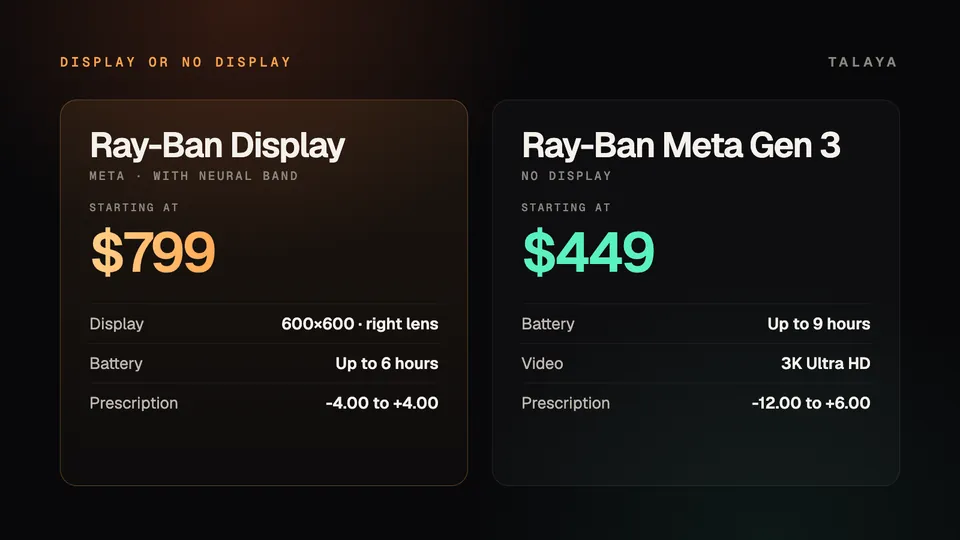
Meta Ray-Ban Display and Ray-Ban Meta Gen 3 are $350 apart. The Display adds a screen in the lens and a wristband to control it. Gen 3 has no screen, but it lasts longer, records sharper video and takes stronger prescriptions.

Part of our Meta Ray-Ban Display guide
Meta Ray-Ban Display and Ray-Ban Meta Gen 3 are both Ray-Ban glasses with a 12MP camera, open-ear speakers and Meta AI, and both are managed in the Meta AI app. The difference is the screen. The Display, which went on sale in the US on Sept. 30, 2025, has a full-color display in the right lens and comes with the Meta Neural Band wristband for $799. Gen 3, which went on sale on Sept. 23, 2026, has no screen and starts at $449.
This comparison is based on Meta's and Ray-Ban's published specifications and Meta's announcements. We haven't tested the two side by side.
The short answer
Buy Meta Ray-Ban Display if you want to read messages, follow walking directions, see live captions or frame photos without pulling out your phone, and you can live with six hours of battery, one frame shape and a narrow prescription range. Buy Ray-Ban Meta Gen 3 if you mostly want a camera, audio and a voice assistant: it lasts longer, comes in more styles, takes a wider range of prescriptions and costs $350 less.
Specs side by side
| Meta Ray-Ban Display | Ray-Ban Meta Gen 3 | |
|---|---|---|
| US price | $799, Neural Band included | From $449 |
| On sale since | Sept. 30, 2025 (US) | Sept. 23, 2026 |
| Display | Full color, 600 by 600 pixels, right lens, 20-degree field of view | None |
| Notable controls | Meta Neural Band, touchpad, voice | Customizable action button, voice |
| Camera | 12MP, 3x zoom, live viewfinder | 12MP, dynamic photos |
| Video | 1,440 by 1,920 pixels at 30 fps | 3K Ultra HD |
| Microphones | Five, plus a contact mic | Six |
| Battery | Up to 6 hours | Up to 9 hours |
| Extra from the case | Up to 24 hours | Up to 50 hours |
| Weight | 69 grams | 51.5 grams (standard Wayfarer) to 54.5 grams (Aviator) |
| Styles | One frame, Shiny Black or Shiny Sand, standard or large | Aviator, Zena, Wayfarer (also large), 27 color and lens combinations |
| Lenses | Transitions, clear to grey | Varies by combination |
| Prescription | -4.00 to +4.00, ordered with the glasses | -12.00 to +6.00 total power (Aviator: -6.00 to +4.00) |
The Display's field of view, video resolution and microphones come from Ray-Ban's spec sheet, the prescription ranges from Meta's help center and buying FAQ, Gen 3's case figure comes from Meta's compare page, its Aviator weight from Meta's listing and the standard Wayfarer's from Engadget, and the rest from Meta's announcements.
What the screen gets you
Everything the Display does differently comes from the screen and the wristband. You can read and reply to messages from WhatsApp, Messenger, Instagram and your phone's texting app, either by voice or by writing with a finger on a surface while wearing the Neural Band. Walking directions show a map in the lens and now cover every US city, according to Meta's July update, and Meta announced cycling and transit directions for the US and Canada in September. Live captions show what the person talking to you is saying, and Meta says translation covers 20 languages.
The camera gets a live viewfinder, so you can frame a shot and zoom by turning your wrist instead of guessing what the lens sees. Meta AI can show step-by-step instructions rather than reading them out. There's also a teleprompter, a calendar app that links to Google Calendar and Outlook, home-screen widgets for weather, stocks and reminders, and Instagram Reels and Threads.
Meta's own buying guide draws the line the same way: "If you want the ability to read and reply to incoming messages and see who's calling without ever taking your phone out of your pocket, opt for Meta Ray-Ban Display."
What Gen 3 does better
Battery life is the biggest gap. Gen 3 is rated for up to nine hours, an hour more than Gen 2, while the Display's help page gives it up to six hours, with up to 24 more from its folding case.
Gen 3 also records 3K Ultra HD video, while Ray-Ban lists the Display's video at 1,440 by 1,920 pixels. Its new six-microphone array cuts more than 90% of background noise on calls and voice commands, according to Meta, and it adds a customizable action button and dynamic photos, which let you choose the best of several frames.
Then there's choice. Gen 3 comes as an Aviator, a Zena cat-eye or a Wayfarer, with the Wayfarer also in a large size, across 27 color and lens combinations. The Display has one Wayfarer-derived frame in two colors and two sizes, and only clear-to-grey Transitions lenses. The Display is also sold in just six countries, and several of its features, such as the updated calendar and Hologram video calls, start in the US or in English only.
Prescription wearers
This can decide it for you. Meta's help center says most Ray-Ban Meta frames, Gen 3 included, support prescriptions from -12.00 to +6.00 total power, with the Gen 3 Aviator limited to -6.00 to +4.00. You can order them with prescription lenses from Ray-Ban.com or participating certified retailers, or add lenses later at participating retailers.
The Display supports nearsightedness, farsightedness and astigmatism up to a total power of -4.00 to +4.00 (sphere plus cylinder) and up to 4.00 of cylinder, in single-vision lenses only. Because the prescription is built into the display lens, it has to be ordered with the glasses and can't be changed later. Meta's FAQ lists it as a $200 add-on in the US, and orders take five to eight weeks. If your prescription is outside that range, Gen 3 is the only one of the two you can wear with it.
What they share
Both pair with the Meta AI app, answer to "Hey Meta," play music, handle calls and take photos with a white capture LED on the front that blinks while recording. Meta says its AI glasses will be the first consumer devices to capture video in Dolby Atmos, and it lists Dolby Atmos capture among the Display's updates and Gen 3's coming features. Meta's Muse agent is coming to its AI glasses "in the coming months," and hearing enhancement to "supported" AI glasses, but Meta hasn't said which models get them.
Which to buy
Meta Ray-Ban Display makes sense if you'd use the screen many times a day: replying to messages on the move, walking around a US city, following conversations through captions or presenting with the teleprompter. It's also the only way to get the Neural Band. Ray-Ban Meta Gen 3 is the better fit if you want glasses that last through a long day, need a stronger prescription, live outside the six Display countries or simply want to spend less.
If Gen 3 is too much, Ray-Ban Meta Audio drops the camera for $349; see Ray-Ban Meta Gen 3 or Ray-Ban Meta Audio. For sport, look at Oakley Meta. And if you're leaning toward the Display, our guides cover its price and how to buy and the Meta Neural Band.
Frequently asked questions
Does Ray-Ban Meta Gen 3 have a display?
No. Gen 3 has a camera, open-ear speakers and microphones, and Meta AI answers you by voice. Meta Ray-Ban Display is the only Meta glasses with a screen in the lens.
Which has better battery life?
Ray-Ban Meta Gen 3, rated for up to nine hours against up to six for Meta Ray-Ban Display. The Display's case adds up to 24 more hours, and Gen 3's adds up to 50, according to Meta's compare page.
Can I get prescription lenses in either?
Yes. Meta's help center gives most Ray-Ban Meta frames a range of -12.00 to +6.00 total power, or -6.00 to +4.00 for the Gen 3 Aviator. Meta Ray-Ban Display supports -4.00 to +4.00, in single-vision lenses ordered with the glasses.
Is Meta Ray-Ban Display worth $350 more than Gen 3?
Only if you'll use the screen often, for messages, walking directions, captions or framing photos. If you mainly want a camera, music and the voice assistant, Gen 3's longer battery life and wider prescription range cost less.
Which one takes better photos and video?
Both take 12MP photos. The Display adds a viewfinder and 3x zoom so you can frame shots, while Gen 3 records higher-resolution 3K video and adds dynamic photos, which let you pick the best of several frames.
Sources
- Engadget: Ray-Ban Meta Gen 3 vs. Ray-Ban Meta Gen 2 (Sept. 24, 2026)
- Meta Store: Compare AI glasses
- Meta: Introducing Ray-Ban Meta Audio and more AI glasses styles (Sept. 23, 2026)
- Meta blog: Ray-Ban Meta Audio and our deepest lineup of AI glasses yet (Sept. 23, 2026)
- Meta: The biggest news from Connect 2026 (Sept. 24, 2026)
- Meta Help Center: How to order prescription lenses for AI glasses
- Meta: Meta Ray-Ban Display, AI glasses with an EMG wristband (Sept. 17, 2025)
- Meta blog: Meta Ray-Ban Display, breakthrough AI glasses available now
- Meta blog: Meta Ray-Ban Display, how to buy and why (Oct. 2025)
- Meta blog: Making Meta Ray-Ban Display more useful to more people (Sept. 23, 2026)
- Meta blog: Meta Ray-Ban Display gets Threads and a new version of Meta AI (July 27, 2026)
- Meta: Which AI glasses are right for you? (May 8, 2026)
- Meta Help Center: About battery life on Meta Ray-Ban Display and Meta Neural Band
- Ray-Ban: Meta Ray-Ban Display product details
Join the conversation
Questions, or something to add? Talk about it with other smart glasses owners in r/Talaya, our community on Reddit.