Smart Glasses · Guide
Meta glasses customer support: who to contact for Ray-Ban Meta, Oakley Meta and Display
Who answers your support request depends on who made the glasses. Meta supports Meta Ray-Ban Display and the Neural Band, Ray-Ban handles Ray-Ban Meta and Oakley handles Oakley Meta. Here is where to start and what to have ready.

Part of our Ray-Ban Meta guide
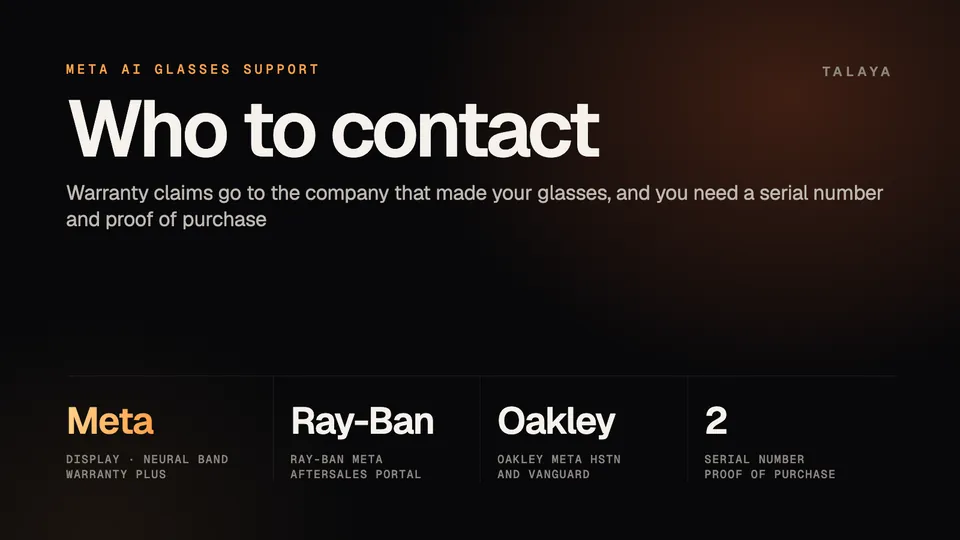
Who answers your support request depends on who made the glasses. According to Meta's help center, Meta handles Meta Ray-Ban Display, the Meta Neural Band and Meta Warranty Plus claims, Ray-Ban handles Ray-Ban Meta, and Oakley handles Oakley Meta, even if you bought them from the Meta Store. The Meta pages we read list no support phone number, chat hours or address, so none appear here.
It is based on Meta's help center, Ray-Ban's and Oakley's warranty documents and the FTC's advice on tech support scams; we haven't contacted any of the support teams.
Who handles what
| Product or request | Who handles it | Where to start |
|---|---|---|
| Meta Ray-Ban Display, Meta Neural Band, Meta-made accessories such as charging cases | Meta, under Meta's Limited Warranty | Meta Store Support |
| Meta Warranty Plus claims (US only) | Meta | Meta Store Support |
| Meta Store orders and returns | Meta | meta.com/my/orders |
| Ray-Ban Meta | Ray-Ban | Ray-Ban aftersales portal or your country's Ray-Ban site |
| Oakley Meta HSTN and Vanguard | Oakley | Oakley aftersales portal or your country's Oakley site |
| Refund inside the return window | The seller | The retailer where you bought them |
Meta's warranty article, in the June 6, 2026 copy we read, lists the first two Ray-Ban Meta generations. Gen 3 and Audio come from the same Meta and EssilorLuxottica partnership, so start with Ray-Ban, as our warranty guide explains. The article doesn't list Meta Glasses, the line that includes the Adventurer, so check the warranty terms that came with your pair or ask the seller.
Ray-Ban's Display FAQ says Meta is the manufacturer of Meta Ray-Ban Display and that Luxottica and Meta may share your name, email address and details of the issue to help resolve service requests. Return windows by seller are in our warranty guide.
Meta Store Support, the help center and the app
The articles we read in Meta's AI glasses help center end with the same box: "Tell us what you need support with and we'll find the best solution for you," above a Get support button and a link to the community forum. The warranty article sends claims for Meta-made products to Contact Meta Store Support, where you provide your order number and describe the issue.
The archived copy of that page we could open showed only its title, so we couldn't read which contact options it offers and can't say which channels, hours or phone numbers it has. Meta publishes the page in local versions, such as meta.com/en-gb/help/support/ for the UK, but we couldn't confirm what each country gets.
Meta points to three other places:
- The Meta AI app. Tap the menu in the top left, then Settings in the bottom left, Help & support and Submit a report. Meta's article (archived copy of Feb. 15, 2026) describes it as a way to report issues and doesn't say you'll get a personal reply, so use Meta Store Support for a repair. The same menu has a Shake phone to report a problem toggle.
- The community forum. A MetaStoreHelp community manager posted a troubleshooting video for Meta Ray-Ban Display there on July 27, 2026, and the forum's Get Help links include a Store Support Team.
- Your Meta account. meta.com/my/devices shows the warranty status of Meta-made products, and Meta Store returns start at meta.com/my/orders.
Ray-Ban and Oakley
For Ray-Ban Meta, Meta's article says claims go through the Ray-Ban aftersales portal, which it calls Ray-Ban's online system for warranty claims and repairs. You pick the issue that matches yours, or the closest one, and describe the problem. Oakley Meta works the same way through the Oakley aftersales portal. Oakley's safety and warranty guide (May 29, 2025 edition) points owners to support at www.oakley.com and says the warranty is valid only with proof of purchase that clearly shows the date. Our warranty guide walks through a claim step by step.
What to have ready
- The serial number. For Meta Ray-Ban Display, open the Meta AI app and tap the glasses icon, the gear icon, General and About: the glasses' and the case's serial numbers are listed there. Ray-Ban's FAQ says the glasses' number is printed on the inside of the left arm and on the end of that arm, which you see under the hinge when you fold it closed. The case's is under its left side flap, and the Neural Band's is underneath the clasp, on the bottom of the metal tab. For Ray-Ban Meta, the glasses' number is on the inside of the left temple, as our warranty guide notes.
- Proof of purchase, such as your order confirmation email or receipt.
- Your order number, if you're writing to Meta Store Support.
- A note of what you've tried. Meta asks owners to update the glasses and the app, restart the glasses and try a factory reset first. Our Display and Neural Band troubleshooting guides walk through those steps.
- A backup. A factory reset deletes the photos and videos on the glasses, so import them first. Ray-Ban's terms make removing your data your responsibility, as our warranty guide notes.
Support outside the US
- Both aftersales portals work only in certain countries. Where they don't, Meta says to use your local Ray-Ban or Oakley website for warranty instructions for your region.
- Warranty length varies. Ray-Ban's and Oakley's terms give one year, or two if you bought in the EU or EFTA. Ray-Ban's Display FAQ says the Display warranty lasts one or two years, depending on the country. Meta Warranty Plus is sold only in the US.
- Ray-Ban's terms say the warranty applies only in countries Luxottica ships to and supports. Meta lists 17 countries where its AI glasses are supported, and the Display is sold in six. Our countries guide has the lists.
Scams that pose as support
The FTC's advice on tech support scams is written about computers, but glasses owners can use the same checks. The FTC says legitimate tech companies won't contact you by phone, email or text message to tell you there's a problem with your computer, and real security pop-up warnings never ask you to call a phone number.
Scammers may also try to get their sites into search results for tech support, or run ads for them, hoping you'll call the number. Starting from the official pages in this guide helps you avoid that. If you call, the FTC says, the impersonators ask for remote access to your computer and often insist on payment by gift card, wire transfer, bank transfer, cryptocurrency or a payment app, because once you pay it's hard to get your money back.
If a message claims you were charged or a subscription renewed, the FTC says to contact the company using a number you know is real, not the one in the message. If you gave a scammer a password, change it right away and change it anywhere else you used it. You can report scams at ReportFraud.ftc.gov.
For a lost or damaged Ray-Ban Meta charging case, Meta says you can order a replacement from meta.com or through the Ray-Ban After Sales Portal. Our replacement case guide has the details.
Frequently asked questions
Is there a phone number for Meta glasses support?
The Meta pages we read don't list one, so we haven't printed any. Meta's help articles end in a Get support button, and its warranty article sends first-party claims to Contact Meta Store Support. For Ray-Ban Meta and Oakley Meta, use the Ray-Ban or Oakley aftersales portal, or your country's local site where the portal isn't available.
Do I contact Ray-Ban or Meta about my Ray-Ban Meta glasses?
Ray-Ban handles warranty claims and repairs, even if you bought the glasses from the Meta Store, according to Meta's help center. Meta handles Meta Store orders, its returns and Meta Warranty Plus claims. Our warranty guide has the steps.
Does a Meta Warranty Plus claim go through Ray-Ban?
No. Meta handles Warranty Plus claims and says to contact Meta Store Support to file one. The plan is sold only in the US and has to be bought with the glasses.
Can I get support if I bought my glasses secondhand or abroad?
It depends on the terms. Ray-Ban's warranty applies only in countries Luxottica ships to and supports, isn't available for glasses bought from anyone other than Luxottica or an authorized dealer, and needs proof of purchase that shows the date. The pages we read don't address secondhand transfers, so ask Ray-Ban or Oakley before you buy.
How can I tell whether a support message is real?
The FTC says legitimate tech companies won't contact you by phone, email or text message to tell you there's a problem, and real security pop-up warnings never ask you to call a number. If a message mentions a charge or renewal, contact the company using a number you know is real, not the one in the message.
Sources
- Meta Help Center: How to file a warranty claim for Meta AI glasses (archived copy of June 6, 2026)
- Meta Help Center: How to report a bug on AI glasses (archived copy of Feb. 15, 2026)
- Meta Help Center: Contact Meta Store Support (archived copy of Oct. 4, 2026; shows only the page title)
- Meta Community: Meta Ray-Ban Display Issues, In the Lab (July 27, 2026)
- Ray-Ban: Meta Ray-Ban Display FAQ (read in the Wayback Machine copy of May 13, 2026)
- Oakley: Oakley Meta AI glasses safety and warranty guide (May 29, 2025 edition)
- FTC: How to spot, avoid and report tech support scams (read Oct. 25, 2026)
Join the conversation
Questions, or something to add? Talk about it with other smart glasses owners in r/Talaya, our community on Reddit.