Smart Glasses · Guide
Ray-Ban Meta camera quality: specs by generation, sample photos and phone comparison
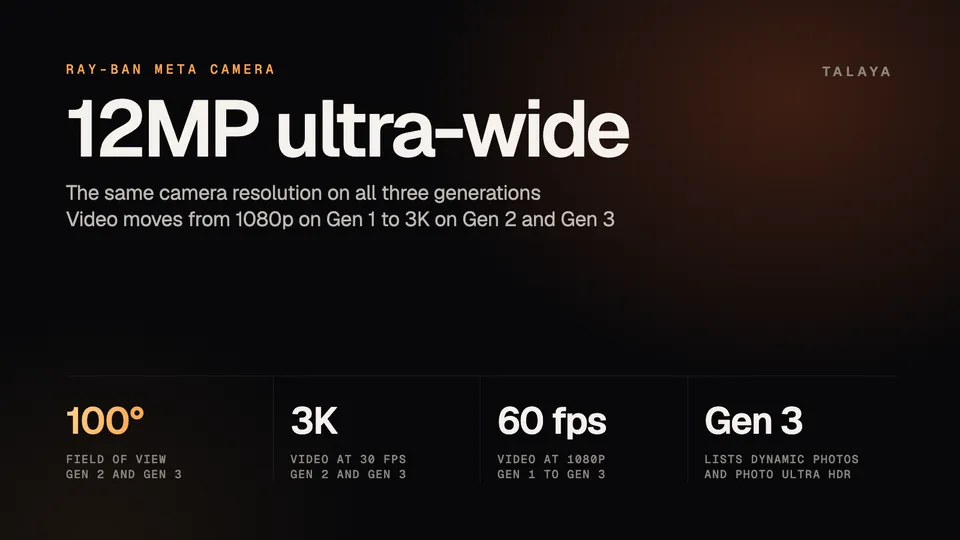
Every Ray-Ban Meta generation lists a 12MP ultra-wide camera, and video goes from 1080p on Gen 1 to 3K on Gen 2 and Gen 3. Here are the specs, three real sample photos, what point-of-view framing does to a photo and how the glasses compare with a phone on paper.
Part of our Ray-Ban Meta guide
Ray-Ban Meta glasses have a 12-megapixel ultra-wide camera on all three generations, and what separates them is mostly video: Gen 1 records 1080p, while Gen 2 and Gen 3 go up to 3K at 30 frames per second. Gen 3, on sale since Sept. 23, also lists dynamic photos and Photo Ultra HDR. The pages we read list no sensor size and no low-light rating, so the questions about quality below rest on the specs Meta does list, Apple's published specs for comparison and three photos taken with the glasses.
This guide is based on Meta's and EssilorLuxottica's published camera specifications, Meta's guide to shooting POV, Apple's published iPhone 17 specifications and the metadata of three sample photos on Wikimedia Commons. We haven't tested the camera.
Camera specs by generation
| Gen 1 (2023) | Gen 2 (Sept. 2025) | Gen 3 (Sept. 2026) | |
|---|---|---|---|
| Camera | 12MP ultra-wide | 12MP ultra-wide | 12MP ultra-wide |
| Photo size | Not listed in the pages we read | Not listed in the pages we read | 3,024 x 4,032 pixels |
| Field of view | Not listed in the pages we read | 100° diagonal, 86° vertical, 70° horizontal | 100°, described as left-oriented |
| Video | 1080p, up to 60 fps | Up to 3K at 30 fps, 1080p at up to 60 fps | Up to 3K at 30 fps, 1080p at up to 60 fps, 720p at 120 fps |
| Stabilization | Adjustable, for 1080p and up at 30 fps | Adjustable, for 1080p and up at 30 fps | Adjustable, for 1080p and up at 30 fps |
| Dynamic photos | Not listed | Not listed | Listed, and called new by Meta |
| Photo Ultra HDR | Not listed | Not listed | Listed |
The Gen 3 figures come from Meta's compare page and Gen 3 listing, and the Gen 1 and Gen 2 figures from EssilorLuxottica's Gen 2 brochure and Meta's shooting guide. The shooting guide lists 1080p for Gen 1 and, for Gen 2, up to 3K Ultra HD at 30 frames per second or 1080p at 60. Meta's Gen 2 announcement puts 3K at more than twice the pixels of Gen 1's video. Gen 3 keeps the same video modes on paper, and the new part is on the photo side. Meta's launch announcement says new dynamic photos let you choose the best frame, and Glasses.com's Gen 3 page describes the feature as automatically capturing multiple frames and recommending the best one. Meta lists Photo Ultra HDR without explaining it, and the pages we read don't say whether Gen 2 gets either feature.
Sample photos from Ray-Ban Meta glasses
The three photos below were taken with Ray-Ban Meta glasses and published on Wikimedia Commons by their photographers. Each file's metadata lists the model as "Ray-Ban Meta Smart Glasses," with no generation. All three predate Gen 3's Sept. 23 launch, so they come from first- or second-generation pairs, which share the 12MP camera that Gen 3 lists. The originals on Commons are vertical, and we cropped them to a wide frame for this page. Commons doesn't say whether the photographers edited them, and each photo is an example its photographer chose to publish, so it shows the camera in good conditions and your own results will vary.
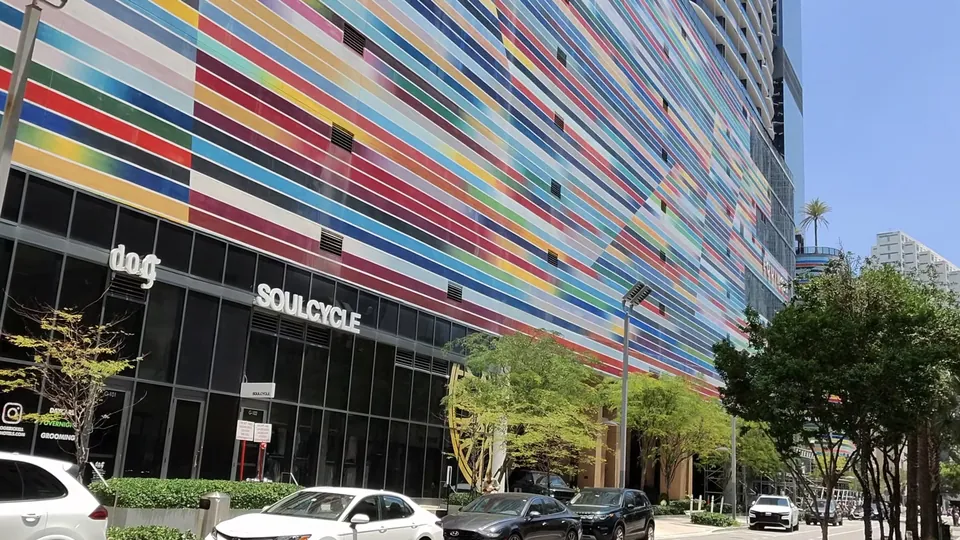
The Miami shot is the easy case: bright sun and strong color. The lettering on the SoulCycle sign is legible, and the building's lines tilt toward the corner of the frame, the perspective stretch a wide lens gives.

The Arcade is harder: a bright glass roof overhead, shaded balconies below and warm lamps in between. The photo keeps detail in the roof's steel framework and in the lamps along the balconies.

From a raised viewpoint, the ultra-wide lens fits the sea, the shoreline and a parking area into one frame. People and cars in the foreground stay distinct, while the far coastline gets small, as distant subjects do on any ultra-wide lens.
The metadata in all three files reports an f/2.2 aperture, ISO 54 and a 2.24 mm focal length, which the Miami and Cleveland files label as 13 mm in 35mm-equivalent terms. Meta doesn't list those numbers in the pages we read, so treat them as what the glasses wrote into the files.
What point-of-view framing means for photos
The camera sits on the glasses, so every photo is taken from the height and direction of your head. Meta's guide describes capturing "from your own point of view" and tells shooters to move their head, crouch or tilt to change the angle. Ray-Ban Meta has no display, so there is no preview while you shoot. Meta's guide mentions a live preview only for Meta Ray-Ban Display, which means you frame a Ray-Ban Meta shot by pointing your head and check it after you import it.
Meta's compare page lists the 100-degree field of view as "left-oriented," while Meta describes the Oakley Meta Vanguard's 122-degree view as "centered." The Ray-Ban Meta camera isn't aligned with the middle of your face, so the center of the photo can sit a little off from where you were looking, which should matter most for close subjects.
Photos are vertical. Meta lists 3,024 x 4,032 pixels for Gen 3, a 3:4 portrait frame, and all three Commons originals are taller than they are wide. At Connect, Meta said a landscape crop mode that saves photos and videos horizontally instead of vertically is coming, and its announcement gave no date.
The lens is wide, and no zoom is listed. Meta says the 100-degree view captures more of your surroundings and suggests thinking about where you stand so that view includes what matters. Its guide mentions zooming while recording only for Meta Ray-Ban Display. For taking and importing photos, see our photos and video guide and import guide.
Low light
In the pages we read, Meta and EssilorLuxottica list no sensor size, no low-light rating and no night mode. The closest thing to an answer is in EssilorLuxottica's brochure for opticians. Asked how to operate the camera in low light or motion conditions, it says: "The 12MP camera automatically adjusts to your environment for consistently high quality photo and video captures." Meta's shooting guide, which is written for video, says natural daylight works best, that the glasses "automatically fine-tune exposure and brightness" when the light isn't ideal, and that you should avoid backlit scenes where the subject comes out dark.
None of the three sample photos here is a low-light shot, and we haven't tested the glasses at night, so we can't tell you how they perform after dark.
How the glasses compare with a phone camera
Apple's published specs for the iPhone 17 are a convenient reference. The closest match to the glasses' lens is the phone's ultra wide camera.
| Ray-Ban Meta (Gen 3) | iPhone 17 | |
|---|---|---|
| Rear cameras | One | Two: 48MP Main and 48MP Ultra Wide |
| Resolution | 12MP | 48MP on both |
| Aperture | f/2.2 in the sample photos, taken with earlier pairs | f/1.6 Main, f/2.2 Ultra Wide |
| Focal length, 35mm equivalent | 13 mm in the sample photos, taken with earlier pairs | 26 mm Main, 13 mm Ultra Wide |
| Field of view | 100° | 120° on the Ultra Wide |
| Stabilization | Adjustable for video, type not stated | Sensor-shift optical on the Main, plus auto image stabilization |
| Night mode | Not listed | Night mode, with Smart HDR 5 and Deep Fusion |
| Zoom | None listed | 2x optical-quality, up to 10x digital |
| Video | Up to 3K at 30 fps | Up to 4K Dolby Vision at 60 fps |
The lens numbers match: the sample photos, taken with pairs from before Gen 3, record the same f/2.2 and 13 mm as the phone's ultra wide. The sensor behind that lens has a quarter of the pixels, and neither company lists the sensor's physical size in the pages we read, so a pixel count says little about how much light either camera collects. The phone also lists a second lens, zoom, optical stabilization and a night mode that the glasses don't. The glasses' advantage is where the camera sits: on your face, ready without a hand. We haven't compared photos from the two.
Settings that affect quality
Resolution is the main video choice. Meta's guide suggests 3K for detailed scenery or action and 1080p for long recordings and social posts, because 1080p saves battery and storage. Only Gen 2 and later offer 3K, and Meta lists it at 30 fps, with 60 fps available at 1080p for fast motion such as biking or running.
Stabilization has four settings in the Meta AI app: low, medium, high and auto. Meta recommends low for slow, steady or scenic shots, medium for everyday walking and high for faster movement like biking or running, and auto picks a level based on how much you're moving.
Format matters less. Meta saves video as MP4 on Android and HEVC on iPhone, and says HEVC gives great quality in less storage.
For photos, the pages we read list no quality settings. Meta gives one photo size, 3,024 x 4,032 pixels on Gen 3, so what you control is the light and the framing. Meta's lighting advice for video, natural daylight and no backlit subjects, should carry over. Our photos and video guide shows where the video settings live in the Meta AI app.
Which generation to pick for the camera
If video quality matters, choose Gen 2 or Gen 3, because Gen 1 stops at 1080p. Between those two, the camera and video specs match on paper, and Gen 3 lists dynamic photos and Photo Ultra HDR, which the pages we read don't list for Gen 2. Our Gen 3 vs Gen 2 and Gen 2 vs Gen 1 guides cover the rest, and the complete guide has the whole lineup, including Ray-Ban Meta Audio, which has no camera.
Frequently asked questions
Is the Ray-Ban Meta camera 12MP?
Yes. Meta and EssilorLuxottica list a 12MP ultra-wide camera on Gen 1, Gen 2 and Gen 3. Meta's Gen 3 listing gives the photo size as 3,024 x 4,032 pixels, as our complete guide notes.
Do Ray-Ban Meta glasses record 4K video?
No. The highest resolution Meta lists is 3K Ultra HD at 30 frames per second, on Gen 2 and Gen 3. Gen 1 records 1080p, according to Meta's shooting guide.
Can Ray-Ban Meta glasses zoom?
Meta's shooting guide lists zooming while recording only for Meta Ray-Ban Display, which has a screen and the Neural Band. The Ray-Ban Meta specifications we read list no zoom.
Do Ray-Ban Meta glasses have night mode?
Not in the pages we read. Meta says the glasses automatically fine-tune exposure and brightness, and EssilorLuxottica says the camera adjusts to the environment, but neither publishes a low-light rating.
Are Ray-Ban Meta photos vertical?
By default, yes. Meta lists 3,024 x 4,032 pixels for Gen 3, and the three sample photos on this page are vertical originals. Meta has announced a landscape crop mode that saves photos horizontally, without giving a date.
Sources
- Meta: Compare AI glasses (Ray-Ban Meta Gen 3 Wayfarer column)
- Meta: Guide to shooting POV with AI glasses
- Meta: Introducing Ray-Ban Meta Audio and More AI Glasses Styles (Sept. 23, 2026)
- Meta Store: Ray-Ban Meta (Gen 3) Wayfarer specifications and FAQ
- Meta: Ray-Ban Meta (Gen 2) Now With Up to 2X the Battery Life and Better Video Capture (Sept. 17, 2025)
- Meta blog: Your personal agent coming to AI glasses (Sept. 23, 2026)
- EssilorLuxottica: Ray-Ban Meta (Gen 2) brochure for eye care professionals (March 2026)
- Glasses.com: Discover Ray-Ban Meta AI glasses (Gen 3)
- Apple: iPhone 17 technical specifications
- Wikimedia Commons: Brickell Ray Ban Meta Wayfarer Smart Glasses - Colorful facade.jpg (Phillip Pessar, CC BY 4.0)
- Wikimedia Commons: Cleveland Arcade ground level storefronts warm light.jpg (Standardpizza, CC BY 4.0)
- Wikimedia Commons: Pandawa beach.webp (Ekkaliningrad39, CC BY 4.0)
Join the conversation
Questions, or something to add? Talk about it with other smart glasses owners in r/Talaya, our community on Reddit.