Smart Glasses · Guide
How to clean Ray-Ban Meta glasses: lenses, camera, charging contacts and case
Meta's care guide comes down to a dampened cloth, mild soap and a dry finish. Here is how to apply it to the lenses, the camera lens, the charging contacts and the case, what to keep away from the glasses, and how to store and pack them.
Part of our Ray-Ban Meta guide
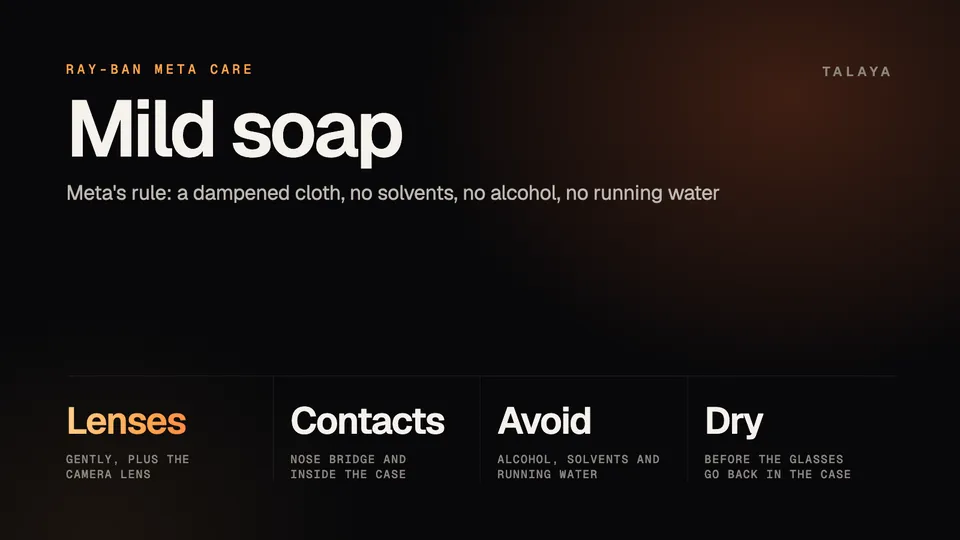
Clean Ray-Ban Meta glasses with a dampened cloth and mild soap. Wipe the lenses, the camera lens and the charging contacts on the nose bridge, then dry everything before the glasses go back in the case. Meta's care guide says to avoid solvents and alcohol and not to hold the glasses under running water, and Ray-Ban's safety guide gives the same cleaning instruction.
This guide is based on Meta's help center and on Ray-Ban's safety guide and FAQ. The copy of Meta's care guide we read was archived on April 13, 2026, before Ray-Ban Meta Gen 3 launched. It gives one set of steps for "Ray-Ban Meta and Oakley Meta HSTN glasses."
How to clean the glasses
- Take the glasses out of the charging case. Ray-Ban's safety guide says not to wear or clean them while they charge.
- Dampen a clean cloth and add a little mild soap. Meta says not to use dirty or abrasive cloths, which "could alter the features of the lenses."
- Gently wipe the lenses, then the camera lens, then the charging contacts on the nose bridge, the three places Meta's guide names.
- Dry the glasses completely before you put them back in the case or put them on.
What to avoid
| Avoid | What the sources say |
|---|---|
| Alcohol and solvents | Meta and Ray-Ban both say to avoid "all types of solvents or alcohol." |
| Running water | Meta: "Don't hold your glasses under running water." The IPX4 rating covers splashes, and our water resistance guide explains the limits. |
| Cleaning while charging | Ray-Ban: "Do not wear or clean the Product while you are charging it." |
| Heat and bending | Ray-Ban says not to heat or bend the front frame or temples, including for fitting. |
Lenses and the camera lens
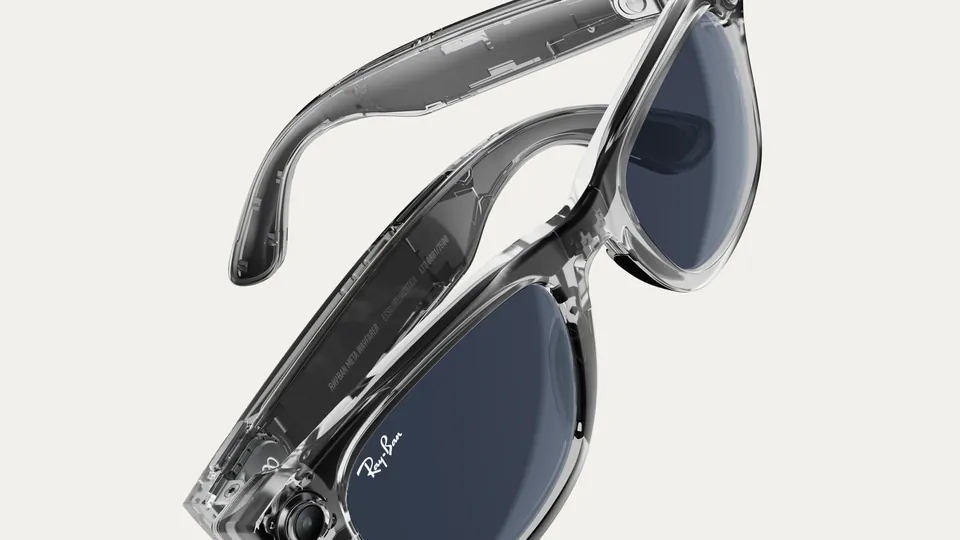
Meta's guide lists the camera lens separately from the lenses, so give it its own gentle wipe with the same damp cloth. The camera is the small round lens at one front corner of the frame. Ray-Ban Meta Audio has no camera, so it has no camera lens to clean.
The Meta Ray-Ban Display section of Meta's guide adds that you can use alcohol-free lens spray or lens wipes. The Ray-Ban Meta section doesn't list either, so a damp cloth and mild soap are the documented method. Ray-Ban's warranty is "limited and not applicable to any lens scratches," so a scratch isn't a warranty claim. Our warranty guide explains what the warranty does cover.
The charging contacts
Metal contacts under the nose bridge of the glasses meet a matching port inside the case. Meta's charging article says dried sweat, dirt and liquid can all interfere with that connection, and that glasses that won't turn on may not be charging while docked. Its instruction reads: "Thoroughly clean both devices, then try to charge again."
Ray-Ban's safety guide says to clean the charging port with the included microfiber cloth and to keep it clear of debris and residue. Ray-Ban's India store FAQ lists a cleaning cloth among the items in the box.
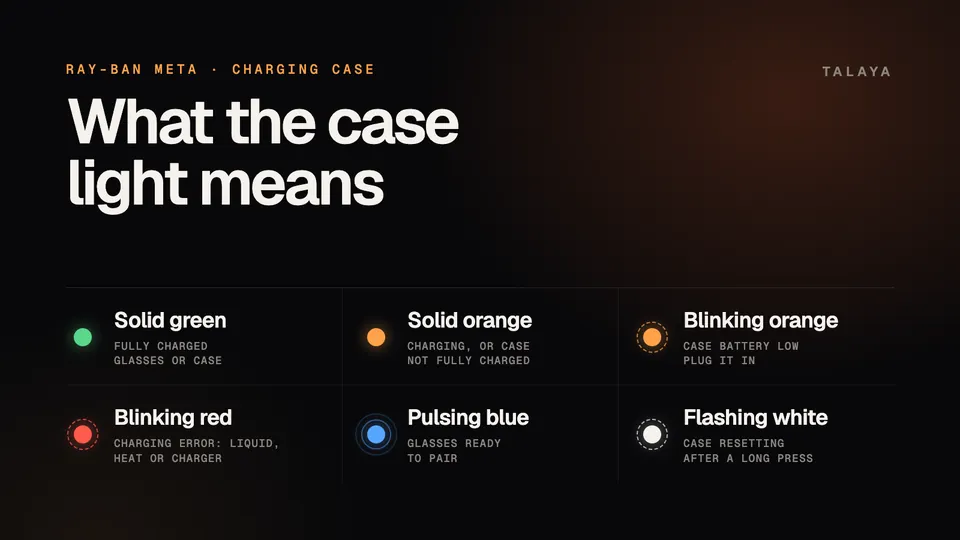
A blinking red light on the case means a charging error. Liquid on the contacts is one of three causes Meta lists, along with heat and a charger the case won't accept. For liquid, Meta says to wipe the contacts clean on both devices and try again. Ray-Ban's FAQ adds that you may have to wait for the glasses and the case to dry fully before charging works.
If cleaning doesn't help, work through our charging guide, or the guide to glasses that won't turn on. On a new pair, Meta says the first charge needs you to remove the protective plastic tab from the metal charging connections in the case.
The case
Meta recommends keeping the glasses in the charging case whenever you aren't wearing them, to protect them from drops and scratches. Neither Meta nor Ray-Ban publishes a method for cleaning the outside of the case. Ray-Ban says the case is "not water resistant" and that liquids could damage it, and the only cleaning step it gives for the charging area is the microfiber cloth. Meta also warns against storing other glasses in the case, which can damage both the glasses and the case.
Storage and travel
Ray-Ban's safety guide says to keep the glasses in their case or pouch in a clean, dry place between -10°C and 35°C (14°F and 95°F), and not to leave them in a car in direct sunlight. It also says not to drop, strike or shake them excessively and to take care when folding the temples in or out. Our overheating guide covers what the glasses do when it is too hot or too cold.
For flights, the guide says to check aviation security rules for personal electronics and notes that the glasses contain lithium-ion batteries and "should not be placed in checked-in luggage." Pack them in your carry-on.
When cleaning isn't the problem
Ray-Ban says to inspect the glasses, the charging port and the charging accessories from time to time. Stop using the glasses if a part is damaged or cracked or an internal component is exposed, and don't try to repair them yourself. Contact support instead. Our warranty, returns and repairs guide walks through a claim.
Frequently asked questions
Can I clean Ray-Ban Meta glasses with alcohol wipes?
No. Meta and Ray-Ban both say to avoid all types of solvents and alcohol. Meta's guide allows alcohol-free lens spray or lens wipes only in its section for Meta Ray-Ban Display glasses, not in the Ray-Ban Meta section.
Can I rinse Ray-Ban Meta glasses under the tap?
No. Meta's care guide says not to hold the glasses under running water. They are rated IPX4, which covers splashes, and our water resistance guide explains the limits.
How do I clean the charging contacts on Ray-Ban Meta glasses?
Wipe the contacts under the nose bridge and the contacts inside the case, then let both dry before you dock the glasses. Meta says to wipe the contacts clean on both devices. Ray-Ban's safety guide says to use the included microfiber cloth on the charging port and not to clean the glasses while they are charging.
Why won't my Ray-Ban Meta glasses charge after I cleaned them?
Liquid left on the contacts can cause a charging error, which shows as a blinking red light on the case. Ray-Ban's FAQ says you may have to wait for the glasses and the case to dry fully. If they still won't charge, see our charging guide.
Does the warranty cover scratched lenses?
No. Ray-Ban's warranty says it is "limited and not applicable to any lens scratches." Our warranty guide explains what the warranty does cover.
Sources
Join the conversation
Questions, or something to add? Talk about it with other smart glasses owners in r/Talaya, our community on Reddit.