Smart Glasses · Guide
Ray-Ban Meta for blind and low-vision users: Be My Eyes and Meta AI
Ray-Ban Meta glasses offer two kinds of visual help: live video calls with Be My Eyes volunteers and spoken descriptions from Meta AI. Here is how to set each up, where they work and what Meta and Be My Eyes say about limits.

Part of our Ray-Ban Meta guide
Ray-Ban Meta glasses give blind and low-vision users two kinds of visual help. Be My Eyes puts you on a live video call with a sighted volunteer who sees through the glasses' camera. Meta AI describes your surroundings and reads text on request. Both can start with "Hey Meta," and both run through the Meta AI app on your phone.
This guide is based on Meta's help center, newsroom and accessibility page and on Be My Eyes' support pages, and we haven't tested the glasses.
Volunteer or Meta AI?
| Be My Eyes volunteer | Meta AI | |
|---|---|---|
| Who answers | A sighted person on a live video call | Meta AI, aloud |
| What it sees | The glasses' camera during the call | A photo the glasses send to Meta's cloud |
| How to start | "Hey Meta, Be My Eyes" | "Hey Meta, describe what I'm seeing" |
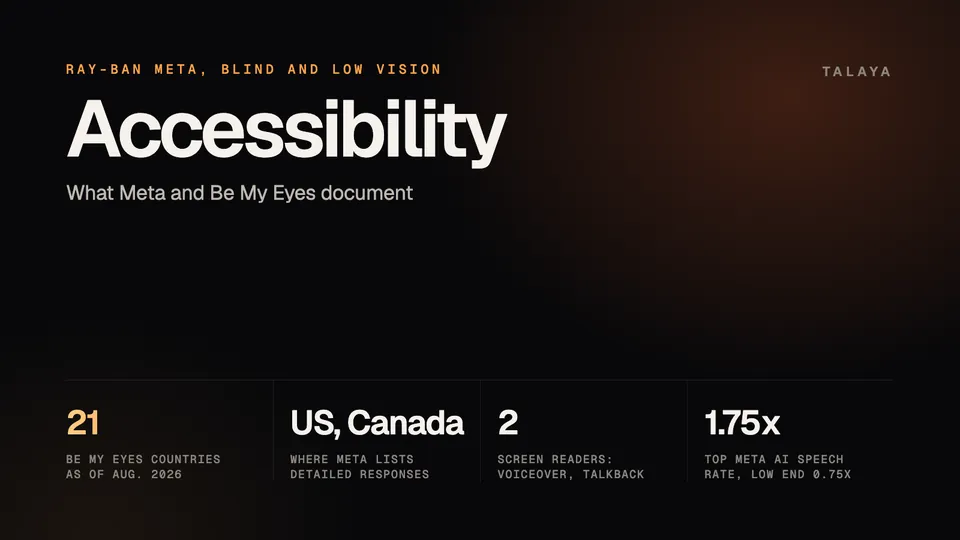
| Where it's listed | 21 countries | Detailed responses: the US and Canada |
Be My Eyes' page on Meta's glasses says the first release provides hands-free volunteer calls, and the pages we read describe no other Be My Eyes feature on them.
Set up Be My Eyes
Volunteers help with everyday tasks such as adjusting a thermostat or sorting and reading mail, Meta's release notes say. They answer through the open-ear speakers, according to Be My Eyes, so your hands stay free.
- Install the Be My Eyes app and log in "as someone needing visual assistance," as Meta's help article puts it.
- In the Meta AI app, tap Glasses in the top right, then Device settings. Swipe down to Be My Eyes, tap Connect Be My Eyes and, when the Be My Eyes app opens, tap Connect. Be My Eyes' FAQ lists the option under Accessibility, so look there if your menu differs.
- Check that Meta AI or voice controls are on, since you start the call by voice.
- On an iPhone, set call audio routing to Automatic: Settings, Accessibility, Touch, Call Audio Routing.
Meta's help article also links to a training guide for blind and low-vision users, made with the Blinded Veterans Association, on the BVA's resources page.
Start, switch and end a call
Say "Hey Meta, Be My Eyes" or "Hey Meta, call a volunteer with Be My Eyes." Meta lists five phrases in all.
- The camera is on the left side of the frame, which matters when you hold something up for a volunteer.
- Double-tap the capture button to move the camera, microphone and speakers between the glasses and your phone. Volunteers can't zoom or switch cameras for you, but they can take a picture in the Be My Eyes app to zoom in on it.
- To end a call, double-tap the touchpad on the right arm or use the Be My Eyes app.
Meta's May 18 post adds two options. "Hey Meta, Be My Eyes with [name]" starts a hands-free video call with a trusted friend or family member instead of a volunteer, and you can connect with trained support representatives from brands such as Tesco, Sony, Amtrak and Hilton. The post doesn't list countries or languages for either.
Where Be My Eyes works
Be My Eyes' FAQ lists 21 countries as of Aug. 14, 2026: Australia, Austria, Belgium, Brazil, Canada, Denmark, Finland, France, Germany, India, Ireland, Italy, Mexico, the Netherlands, Norway, Spain, Sweden, Switzerland, the United Arab Emirates, the UK and the US, including Alaska and Hawaii. Meta's accessibility page also says 21 markets, and Be My Eyes says it and Meta are working on a timeline for others.
Language is less clear. Meta's help article, archived June 7, says calls are available in English in supported countries. Be My Eyes' newer FAQ says the call starts with a Meta AI voice command, so it depends on the language your Meta AI is set to, and that Meta AI tells you if yours doesn't support it yet.
You need Ray-Ban or Oakley Meta AI glasses, not Ray-Ban Stories. Volunteers see through the camera, and Ray-Ban Meta Audio has none, as our Meta AI guide notes. Meta's release notes say Be My Eyes reached Meta Ray-Ban Display the week of April 13, 2026.
On privacy, Meta says the volunteer only has access to the video you share from the glasses' camera and microphone during an active call. Be My Eyes' FAQ says Meta doesn't have access to the call video or snapshots, which are removed when the call ends.
Ask Meta AI to describe what's in front of you
Say "Hey Meta, describe what I'm seeing," or begin with "Hey Meta, look and..." followed by your question. The glasses take a photo and send it to Meta's cloud, and Meta AI answers aloud, according to Meta's help article. You can review the request, photo and answer in the app under Chats. Meta's accessibility FAQ says the camera sits in the top corner on the left side, and that for photos you can point your head toward the subject and keep the glasses level instead of turning your face. Meta also says turning off "Hey Meta" switches off Meta AI's camera use by voice, so leave it on if you rely on descriptions. Meta AI can be set to 13 languages on the glasses, and 18 more work through partners with limits, including slower answers to questions about what you see. Our Meta AI guide has the lists.
Turn on detailed responses
Detailed responses make the descriptions richer. Meta's accessibility page gives the steps: open the Meta AI app, tap the Glasses icon, go to Accessibility, scroll down to Detailed responses and tap Turn on detailed responses.
Meta's release notes say detailed responses began reaching people in the US and Canada the week of June 23, 2025. The week of Feb. 3, 2026, they reached live AI sessions on Ray-Ban Meta, Oakley Meta HSTN and Oakley Meta Vanguard there, described as "richer visual descriptions." Live AI, which keeps the camera and microphone on for follow-up questions, is available in English. The pages we read give no language for the setting itself. At Connect, Meta said richer detailed responses are coming, shaped by feedback from blind and low-vision users, as our Connect recap notes.
Read text aloud
Meta's accessibility page says Meta AI "will read texts, describe surroundings or connect to a Be My Eyes volunteer for real-time support." Meta's help article on asking about what you see gives "Hey Meta, translate this text into English" and "Hey Meta, summarize this" as examples, and says you can point at a phone number and say "Hey Meta, call this phone number." Our voice commands guide adds asking what a sign or menu says.
Donald Overton, a US Army veteran profiled in Meta's May 18 post, says "I'm able to use the technology to read the menu to me." Meta doesn't list a dedicated read-aloud command, and the pages we read give no accuracy figures for descriptions or text reading.
Calls, messages and directions by voice
Say "Hey Meta, call [name]," or "Hey Meta, call [name] on WhatsApp" to pick the service. Meta AI asks you to confirm the contact. Answer or decline an incoming call with "Hey Meta, answer" or "Hey Meta, decline," and hang up by double-tapping the touchpad. Emergency calls, such as 911 in the US, must be started from your phone.
For messages, say "Hey Meta, send a message to [name]." Meta AI reads your message back so you can say yes, no or cancel before it sends. The glasses can also announce who is calling or texting and read messages aloud, and "Hey Meta, read it" plays a message after the announcement. Our iPhone vs Android guide covers the toggles.
On Ray-Ban Meta, "Hey Meta, direct me to" followed by a place starts walking directions, which our voice commands guide says Meta lists as a beta in selected cities. Meta said at Connect that directions based on landmarks are coming. On Meta Ray-Ban Display, Meta's navigation article describes audio turn-by-turn directions you can start by voice in the US and in cities in Canada, the UK, France and Italy.
Other settings that help
- Meta AI's speaking rate runs from 0.75x to 1.75x, and its voice can be low, medium or high, under Device settings, Meta AI, Language and voice.
- The Meta AI app works with VoiceOver and TalkBack, and with large text and magnification set in the phone's own settings.
- Meta said on May 18 that the action button on Ray-Ban Meta Optics styles and Oakley Meta Vanguard can start a Be My Eyes call or a prompt such as "describe what's around me." Ray-Ban says Gen 3's button is configurable too, but doesn't list its options.
- Meta says most of its AI glasses take prescription lenses, and our prescription guide has the ranges. On Meta Ray-Ban Display, the Vision settings cover text size, color filters, a screen reader and magnification.
- Meta's May 18 post names two third-party apps for the glasses: OOrion, for locating objects, reading text and detecting obstacles, and Aira, for trained visual interpreters. It doesn't say where they're available.
To report an accessibility problem, Ray-Ban's FAQ says to use Help & Support in the Meta AI settings, and Meta's help article links to an online feedback form.
Frequently asked questions
Does Be My Eyes work on Ray-Ban Meta glasses?
Yes. After you link the two apps, say "Hey Meta, Be My Eyes" to call a volunteer. You need Ray-Ban or Oakley Meta AI glasses, not Ray-Ban Stories, and Be My Eyes lists 21 countries as of Aug. 14, 2026.
How do I turn on detailed responses on Ray-Ban Meta?
Meta says to open the Meta AI app, tap the Glasses icon, go to Accessibility, scroll down to Detailed responses and tap Turn on detailed responses. Meta lists the setting for the US and Canada.
Can Ray-Ban Meta glasses read text out loud?
Meta's accessibility page says Meta AI will read texts and describe surroundings. Meta's help article gives "translate this text into English" and "summarize this" as examples, and it doesn't list a dedicated read-aloud command.
Is the Meta AI app compatible with screen readers?
Yes. Meta and Be My Eyes both say it works with iOS VoiceOver and Android TalkBack. Meta adds that it works with large text and magnification set in the phone's own settings.
Can I change how fast Meta AI speaks?
Yes. In the Meta AI app, go to Device settings, Meta AI, then Language and voice. Meta says the speaking rate runs from 0.75x to 1.75x, and the voice can be low, medium or high.
Can I call a friend with Be My Eyes instead of a volunteer?
Yes. Meta said on May 18, 2026, that you can say "Hey Meta, Be My Eyes with [name]" to start a hands-free video call with a trusted friend or family member. The post doesn't list countries or languages for it.
Sources
- Meta Help Center: How to call a volunteer using Be My Eyes on AI glasses (archived copy of June 7, 2026)
- Be My Eyes Help Center: Meta AI Glasses FAQ (updated Aug. 14, 2026)
- Be My Eyes: Be My Eyes Smartglasses (page as of Oct. 25, 2026)
- Meta Newsroom: Our AI wearables are "changing the game" for disabled people (May 18, 2026)
- Meta: AI glasses from Meta, empowering accessibility (archived copy of Aug. 18, 2026)
- Meta Help Center: AI glasses release notes (archived copy of Sept. 21, 2026)
- Meta Help Center: Ask Meta AI about what you see on AI glasses (archived copy of Sept. 21, 2026)
- Meta Help Center: Call and message using AI glasses (archived copy of June 9, 2026)
- Meta Help Center: Meta View app is now the Meta AI mobile app (archived copy of June 12, 2026)
- Meta Help Center: How to get walking directions on Meta Ray-Ban Display (archived copy of May 21, 2026)
- Ray-Ban: Ray-Ban Meta FAQ, US store (archived Nov. 14, 2025)
- Ray-Ban: Ray-Ban Meta FAQ, India store (page as of Oct. 25, 2026)
Join the conversation
Questions, or something to add? Talk about it with other smart glasses owners in r/Talaya, our community on Reddit.