Smart Glasses · Guide
How to use Oakley Meta glasses with Garmin and Strava: setup, features and limits
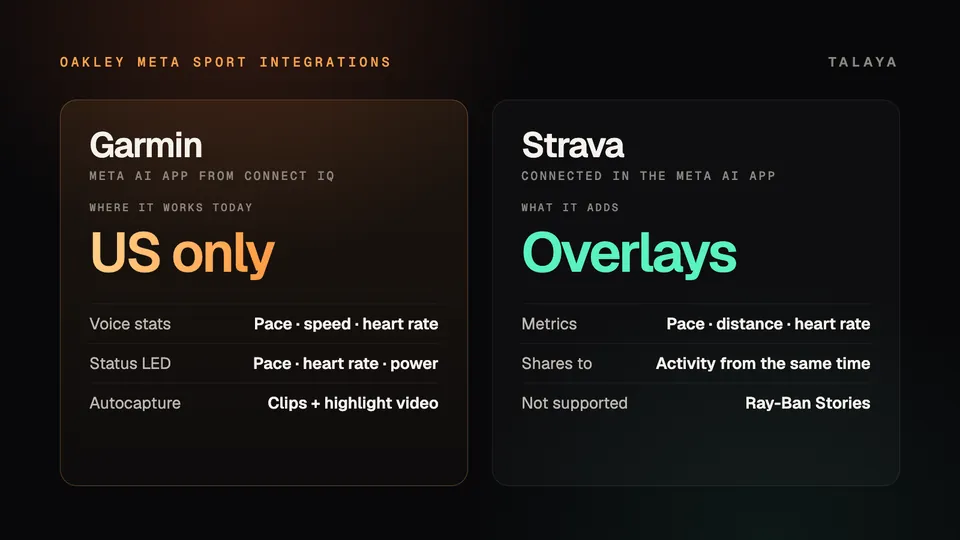
Garmin's voice stats, status LED and autocapture need Garmin's Meta AI app and work only in the US for now. Strava overlays are a connection inside the Meta AI app. Here is how to set up both and which glasses each one supports.

Part of our Oakley Meta guide
Oakley Meta's Garmin and Strava features both run through the Meta AI app. Garmin's real-time features (voice stats, a status LED and autocapture) need Garmin's own Meta AI app on a compatible smartwatch or cycling computer, and Garmin says the integration is currently available only in the US. Strava is a connection you switch on inside the Meta AI app, and it puts your stats on photos and videos.
Garmin's Oakley Meta page names both Oakley Meta Vanguard and Oakley Meta HSTN but doesn't say whether every feature runs on both models, so check the one you care about before you buy. Strava's help center says its overlays work with all Oakley Meta and Ray-Ban Meta glasses except Ray-Ban Stories.
This guide is based on Garmin's page, Connect IQ Store listing and press release, Strava's help center and Meta's and Oakley's announcements and product pages; we haven't tested either integration.
What each integration does
| Feature | What it does |
|---|---|
| Voice stats | Ask Meta AI for pace, speed, heart rate or alerts mid-workout. For snow sports, Garmin adds slope stats: speed, vert and run count |
| Status LED | Set a target such as pace, heart rate or a power zone. A light inside the frames shows whether you are in range |
| Autocapture | Smart triggers record video from your performance metrics and milestones, then give you a highlight video with your Garmin data on it |
| Activity summaries | Post-workout stats in the Meta AI app, which you can also ask for on the glasses, per Garmin's press release |
| Workouts | Create custom run and bike workouts by voice |
| Overlays | Graphics of your metrics on photos and videos, which you can share to Instagram, Facebook or WhatsApp. Strava also syncs them to your activity |
Garmin says the real-time features need "the Meta AI app from the Connect IQ Store and a compatible Garmin device." It adds that "select Meta AI mobile app features" work with "any Garmin smartwatch or cycling computer" without the Connect IQ app, but doesn't say which ones.
Which glasses and Garmin devices work
Garmin's Connect IQ listing for the Meta AI app lists the compatible glasses as the "Oakley Meta collection & Ray-Ban Meta collection," while Garmin's Oakley Meta page names only Vanguard and HSTN. Strava names the same two families and leaves out Ray-Ban Stories.
Oakley's landing page gives Vanguard a "Fitness Agent" with hands-free voice alerts and a status LED "visible only to you," plus skiing, snowboarding and golf features, and the Vanguard product page has a full section on both integrations. HSTN's entry on the landing page says only that Meta AI "has teamed up with top fitness technology brands, Garmin and Strava," and an archived copy of HSTN's product page from May 8, 2026 mentions neither. Garmin doesn't say whether the status LED, autocapture or slope stats run on HSTN or Ray-Ban Meta. If one feature decides your purchase, ask Garmin or Oakley first.
On the Garmin side, the page says "select Garmin smartwatches and cycling computers" work, and Oakley notes that compatible devices are sold separately. Garmin links "a full list of compatible Garmin devices" to the Connect IQ listing, which as we could read it doesn't print the models. Check that list before you buy a Garmin for this.
Set up Garmin
- Pair the glasses with the Meta AI app (our Meta AI app guide explains it). Oakley's checklist asks for iOS 14.4 or later, or Android 10 or later with location services on, and a Meta account.
- Check that your Garmin smartwatch or cycling computer is on Garmin's compatible-device list.
- Download the Meta AI app to your Garmin from the Connect IQ Store. The listing says: "To get started, download Meta AI to your Garmin device."
- In the Meta AI app, set up App Connections with Garmin Connect. Meta says this gives you activity summaries in the app after each workout, and it lists Apple Health and Health Connect by Android as the other options.
- Start a workout on your Garmin and ask Meta AI for your stats.
- To use the status LED or autocapture, set an LED target and enable autocapture's smart triggers, as Garmin describes. The pages we read don't say where in the apps you do that.
Connect Strava
- Open the Meta AI app and go to the Glasses tab.
- Tap Settings (the gear icon), then Apps, then Strava, then Connect Strava.
- Log in to Strava and authorize the connection.
- Capture photos and videos during your activity.
- To add stats, open your Meta AI Gallery, select the photo or video, tap Stats, choose metrics such as distance, pace, heart rate or power, and tap Save.
- Share the media. When you share to Strava, the edited photo or video syncs with the activity you recorded at that time. You can also share it to Instagram, Facebook and other apps.
To disconnect, go back to the same menu and select Disconnect Strava. Strava says media can only go to the activity from the same time frame, but you can export it to your phone's Photos app and upload it to another activity by hand.
What you can ask Meta AI during a workout
Meta's examples are "Hey Meta, what's my heartrate?" and "Hey Meta, how am I doing?" Oakley's Vanguard page uses "Hey Meta, what's my pace?" Garmin says you can ask for metrics including pace, speed and heart rate, or for tailored alerts, and for slope stats when you ski or snowboard. It also gives an example of building a workout by voice: "Hey Meta, create a 1 hour bike ride workout with power between 170W and 190W." Oakley says Vanguard has voice shortcuts that open actions such as stats or music without saying "Hey Meta."
Status LED and autocapture
The status LED is separate from the capture LED. Garmin says the status light sits inside the frames and "will let you know if you're in range as you move," while Oakley says the capture LED on the front "signals to others when you're taking a photo or video."
Autocapture records on its own. Meta says the glasses capture clips "when you hit key distance milestones or ramp up your heart rate, speed, or elevation," and Garmin's press release says you get the highlight video afterward in the Meta AI mobile app. Because autocapture records without a tap, our guide to recording with smart glasses covers the legal side.
US-only and other limits
- Garmin says the integration is "currently only available in the U.S.; coming soon to other regions."
- Every Meta AI feature needs a paired phone with the Meta AI app installed, Garmin says.
- Garmin's listing says voice commands support only Chinese, English (Australia, India, UK, US), French (France), German, Hindi, Italian, Japanese, Kannada, Korean, Portuguese (Brazil), Spanish (Mexico, Spain) and Telugu.
- Strava's help article states no country limit. Oakley's product pages note that Meta AI and voice commands are available only in selected countries and languages.
Frequently asked questions
Does Oakley Meta HSTN work with Garmin?
Garmin's page names HSTN alongside Vanguard, and Oakley's landing page says Meta AI has teamed up with Garmin and Strava for HSTN. Garmin doesn't say whether every feature runs on both models, and an archived copy of Oakley's HSTN product page from May 8, 2026 doesn't mention Garmin or Strava. Ask Oakley or Garmin about a specific feature before you buy.
Do Ray-Ban Meta glasses work with Strava and Garmin?
Strava says its overlays work with all Ray-Ban Meta glasses except Ray-Ban Stories. Garmin's Connect IQ listing for the Meta AI app names the Ray-Ban Meta collection as compatible, but Garmin's own Oakley Meta page names only Vanguard and HSTN and doesn't say which features run on Ray-Ban Meta.
Do I need a Garmin to put Strava stats on photos and videos?
Strava's help article asks for the Meta AI app and a Strava login to authorize the connection, and it doesn't mention Garmin. It says media captured during an activity can be shared to the Strava activity recorded at the same time.
Can I use the Garmin features outside the US?
Not yet, according to Garmin, which says the integration is currently available only in the US and coming soon to other regions. Its page gives no dates.
Can other people see the status LED?
Oakley says the status LED is "visible only to you." The capture LED on the front is a separate light that Oakley says signals to others when you're taking a photo or video.
Sources
- Garmin: Oakley Meta AI glasses
- Garmin Connect IQ Store: Meta AI app listing
- Garmin Newsroom: Garmin powers live data for Oakley Meta Vanguard AI glasses (Sept. 17, 2025)
- Strava Help Center: Meta glasses and Strava
- Meta: Athletic intelligence is here, meet Oakley Meta Vanguard (Sept. 17, 2025)
- Oakley: The new Oakley Meta AI glasses (US landing page)
- Oakley: Oakley Meta Vanguard product page (archived copy of April 19, 2026)
- Oakley: Oakley Meta HSTN product page (archived copy of May 8, 2026)
Join the conversation
Questions, or something to add? Talk about it with other smart glasses owners in r/Talaya, our community on Reddit.