Wearables · Guide
Apple Watch ECG app explained: supported watches, AFib results and what it can't detect
The Apple Watch ECG app takes a 30-second recording on demand and checks it for atrial fibrillation. It works on Series 4 or later and all Ultra models, and Apple says it cannot detect a heart attack.
Part of our Apple Watch guide
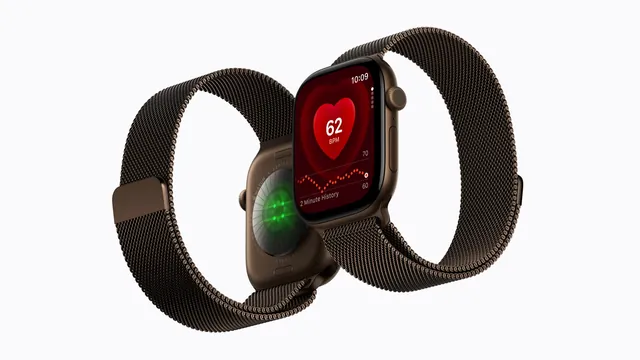
The Apple Watch ECG app records your heart's electrical signal for 30 seconds when you ask it to, then classifies the result, including whether it sees signs of atrial fibrillation (AFib). It is separate from irregular rhythm notifications, and Apple says it cannot detect a heart attack. Apple's support page lists it for Apple Watch Series 4 or later and all Apple Watch Ultra models.
This guide is based on Apple's support pages and published specifications; we haven't tested the feature. Apple's ECG support page carries a Sept. 14, 2026 date. The Series 12 tech specs page has no date.
Which watches have the ECG app
Apple says the ECG app uses "the electrical heart sensor on Apple Watch Series 4 or later and all models of Apple Watch Ultra". A footnote on the same page adds: "The ECG app is not supported on Apple Watch SE or with Apple Watch For Your Kids."
Apple's Series 12 specs page repeats the rule: Series 4 and later, excluding Apple Watch SE models, and all Ultra models. No Apple page we read names Ultra 4 separately for this feature, but "all models of Apple Watch Ultra" would cover it. Our Apple Watch guide notes that Apple's SE 3 spec sheet doesn't list the ECG app.
The app is intended for people 22 or older. Apple's support page says it "is not intended for use by people under 22 years old."
What you need on the phone and watch
Apple's support page tells you to update your iPhone to the latest version of iOS and your Apple Watch to the latest version of watchOS. It gives no minimum version number for the ECG app. The only numeric requirement we found is on the Series 12 specs page, and it covers the watch as a whole: an iPhone 11 or later, including iPhone SE (2nd generation or later), with iOS 27 or later.
Setup runs through the Health app on the iPhone, which installs the ECG app on the watch.
Availability in the US and by version
Apple's watchOS feature availability page lists the ECG app by country, and the United States is on that list. The page is undated, so check it again before you buy. Apple's support pages say the ECG app is "currently available only in certain countries and regions" and tell you to confirm yours before setting up.
Versions can also differ by country. Apple says that "due to regulations in your country or region, ECG version 1 or ECG version 2 might not be available." To see which version you have, open Settings on the watch, tap Heart, then tap ECG. The pages we read don't say which version a US watch gets or which watch models get version 2.
How to take an ECG
Apple says the recording takes 30 seconds. Its instructions for the position are short: rest your arms on a table or in your lap, and with the hand opposite your watch, hold your finger on the Digital Crown.
Apple lists several reasons to take one, including when you receive an irregular rhythm notification. The ECG waveform, its classification and any symptoms you note are saved in the Health app on your iPhone or iPad. From there you can share a PDF with a doctor.
Apple also says that if you use a secondary iPhone that isn't paired to your Apple Watch, ECG notifications will be delayed.
What the results mean
Apple describes the app as generating "an ECG similar to a single-lead ECG without a prescription from your doctor." The results Apple's page explains are these:
- Sinus rhythm. Apple says this means the heart is beating in a uniform pattern between 50 and 100 BPM. It applies only to that recording and, in Apple's words, doesn't mean your heart beats with a consistent pattern all the time.
- AFib. Apple says this means the heart is beating in an irregular pattern. If you haven't been diagnosed with AFib, Apple says to talk to a doctor.
- Inconclusive. In ECG version 1, this can happen when your heart rate is between 100 and 120 BPM and you are not in AFib.
- Poor Recording. Apple says this classification is unique to ECG version 2.
Version 1 and version 2: the BPM limits
The main difference between the versions is the heart rate range. Apple says: "The ECG app ver. 1 can check for AFib between 50 and 120 BPM. The ECG app ver. 2 can check for AFib between 50 and 150 BPM."
| ECG version 1 | ECG version 2 | |
|---|---|---|
| Heart rate range for AFib checks | 50 to 120 BPM | 50 to 150 BPM |
| Inconclusive at 100 to 120 BPM without AFib | Can happen | Not listed for version 2 on the page we read |
| Poor Recording result | Not a result | Yes |
What Apple says it can't detect
Apple says: "The ECG app cannot detect a heart attack." It adds that the app "cannot detect other heart-related conditions. These include high blood pressure, congestive heart failure, high cholesterol, or other forms of arrhythmia."
Apple's advice for symptoms is not to rely on the watch: "If you ever experience chest pain, pressure, tightness, or what you think is a heart attack, call emergency services immediately."
What Apple says about accuracy
Apple's page gives figures from its own clinical work. Apple says a study of about 600 subjects in a controlled setting showed 99.6% specificity for sinus rhythm classification and 98.3% sensitivity for AFib classification, for the classifiable results. Apple also warns that real-world use "may result in a greater number of strips being deemed inconclusive and not classifiable."
Those are Apple's numbers. We didn't read an independent accuracy study, and the pages we read don't give an FDA clearance status for the app, so we make no claim about it.
Irregular rhythm notifications are a different feature
The ECG app is something you start. Irregular rhythm notifications are a separate feature, and Apple's Series 12 specs give them their own footnote: they "are not intended for use by people under 22 years old or those who have been previously diagnosed with atrial fibrillation (AFib)." Apple's heart sensor page says they are available only with watchOS 5.1.2 or later. The pages we read don't describe how often the watch checks or how a notification is delivered.
The two connect in one place. Apple's list of reasons to take an ECG includes receiving an irregular rhythm notification, so the notification can prompt you to record.
Apple's other health alerts are separate again. See our guides to hypertension notifications and sleep apnea notifications. If you are comparing watches, our Galaxy Watch 9 vs Apple Watch Series 12 piece says we couldn't confirm from the pages we read whether Samsung's watch has an ECG feature.
Frequently asked questions
Which Apple Watch models have the ECG app?
Apple says the ECG app works on Apple Watch Series 4 or later and all models of Apple Watch Ultra. It is not supported on Apple Watch SE or with Apple Watch For Your Kids.
How long does an ECG recording take?
Apple says the recording takes 30 seconds. You rest your arms on a table or in your lap and hold a finger of the hand opposite your watch on the Digital Crown.
Does a sinus rhythm result mean my heart is healthy?
No. Apple says a sinus rhythm result only applies to that particular recording and doesn't mean your heart beats with a consistent pattern all the time.
Can the ECG app detect a heart attack?
No. Apple says the ECG app cannot detect a heart attack. If you have chest pain, pressure or tightness, or think you are having a heart attack, Apple says to call emergency services immediately.
Is the ECG app the same as irregular rhythm notifications?
No. They are separate features. Irregular rhythm notifications have their own Apple footnote: they are not intended for people under 22 or people previously diagnosed with AFib.
Sources
Join the conversation
Questions, or something to add? Talk about it with other smart glasses owners in r/Talaya, our community on Reddit.