Smart Glasses · Guide
Oakley Meta battery life: how long HSTN and Vanguard last on a charge
Meta and Oakley rate HSTN at up to eight hours and Vanguard at up to nine, with up to 48 and 36 more hours from the case. Here are the nonstop-use figures, charging times, battery saver and how both compare with Ray-Ban Meta.
Part of our Oakley Meta guide
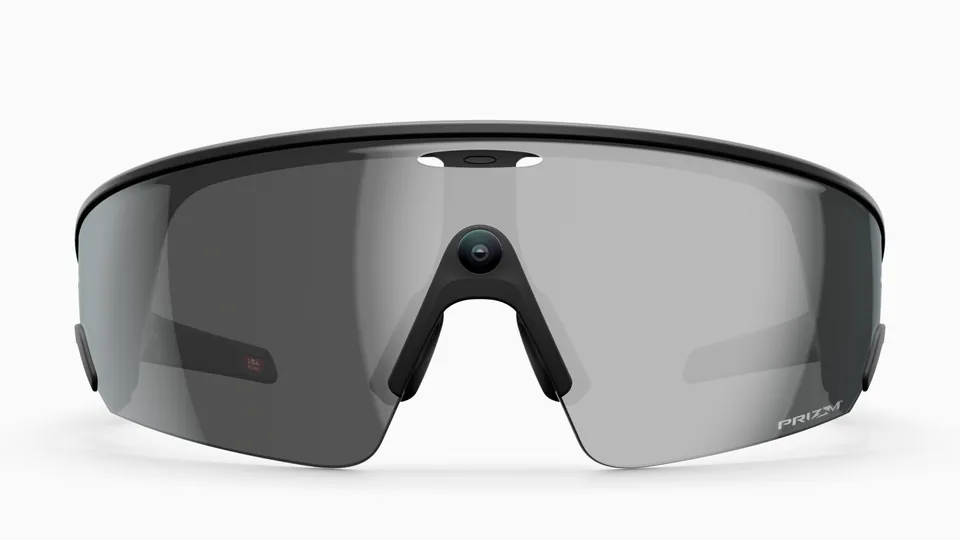
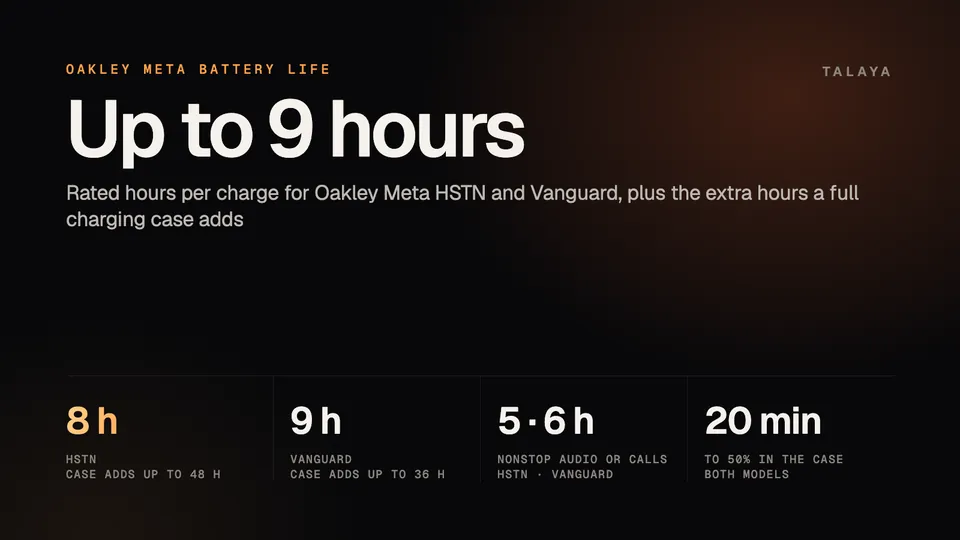
Oakley Meta HSTN is rated for up to eight hours of typical use and Oakley Meta Vanguard for up to nine, according to Meta and Oakley. A full charging case adds up to 48 hours for HSTN and up to 36 hours for Vanguard. For nonstop music or calls, the figures are five hours and six hours. Those are ceilings: Oakley's footnotes say battery life varies with use, configuration and settings, and that actual results will vary.
This guide is based on Meta's and Oakley's published specifications and product pages, EssilorLuxottica's brochure for opticians and Oakley's safety guide. We haven't tested the batteries.
Battery life at a glance
| Oakley Meta HSTN | Oakley Meta Vanguard | |
|---|---|---|
| Typical use | Up to 8 hours | Up to 9 hours |
| Nonstop audio or calls | Up to 5 hours | Up to 6 hours |
| Standby | Up to 19 hours | Not stated |
| Extra from a full case | Up to 48 hours | Up to 36 hours |
| Glasses plus case (our sum) | About 56 hours | About 45 hours |
| To 50% in the case | About 20 minutes | About 20 minutes |
| Full charge of the glasses | 75 minutes | 75 minutes |
| Case recharge from empty | 3.5 hours | 3.5 hours |
The typical-use and nonstop figures come from Oakley's HSTN and Vanguard product pages, which call the headline number "moderate usage" without saying what that means. The standby figure comes from EssilorLuxottica's brochure for opticians, which also gives HSTN's 75-minute full charge. Oakley's Vanguard page gives the same 75 minutes for Vanguard.
Vanguard gets an extra hour on the glasses and an extra hour of nonstop audio, while HSTN's case holds 12 more hours, so HSTN has more total reserve. HSTN's 19-hour standby rating means a pair left switched on and unused would run flat in under a day. Oakley's FAQ says HSTN has a power switch on the inside of the left arm, near the hinge, and that Vanguard has a power button under the left arm that you hold for three seconds to turn off.
What the figures cover
Oakley's FAQ on its Oakley Meta page doesn't name a model, but its five hours of music matches HSTN's nonstop rating. It says one full charge covers about 1,200 photos captured and transferred or about an hour and a half of video calls, that a full case provides five extra charges of the glasses, and that results vary with use. Five charges at eight hours each would come to about 40 hours, below the 48 hours on HSTN's spec sheet, and the pages we read don't reconcile the two.
How charging works
The glasses charge in the case. Oakley's setup FAQ says to put them in the case and connect the case to a power source, and we found no other charging method in the pages we read. The case takes USB-C. Neither model ships with a cable or wall adapter: Oakley's product pages say the cable is left out to reduce waste, and its safety guide says the wall adapter and cable aren't included.
In the case, the glasses reach 50% in about 20 minutes. EssilorLuxottica's brochure for HSTN gives both 20 and 22 minutes for 50% in different places, and 45 minutes for 80%. A full charge takes 75 minutes for either model, according to Oakley. Either case takes 3.5 hours to fill from empty with a USB-C cable, according to Meta's battery article, which also gives HSTN 80% in 45 minutes and Vanguard 50% in 20 minutes. On HSTN, the case LED shows the case's charge when it's empty and the glasses' charge when they're docked, according to the brochure.
Battery saver
Meta says battery saver is available on all Ray-Ban Meta glasses and on Oakley Meta HSTN and Vanguard. Switched on at 20% battery, it can extend battery life by up to 47%, and switched on at a full charge, by up to 88%. While it's on, voice activation pauses, automatic volume adjustment and automatic photo and video transfers stop, and video is limited to one minute at 1080p and 30 frames per second. You can still take photos, make calls and play music and podcasts.
To turn it on, open the Meta AI app, go to Device settings, tap Battery and turn on Battery saver. A "Turn on automatically" option starts it when the battery falls to 20% and the glasses aren't charging, and it switches off by itself when they reach 75%. Our Ray-Ban Meta battery guide has Meta's full description.
Cold, heat and sport use
Neither Oakley nor Meta publishes an operating temperature range for these glasses. Meta's battery article does cover the cold: below 32°F (0°C), insulating the glasses with a beanie, helmet or balaclava can help maintain battery performance, charging may take longer and pauses while the temperature stays below freezing, and turning off auto-import can save battery. Oakley's safety guide, in the May 2025 edition we read, which predates Vanguard, gives a storage range: keep the glasses in their pouch or a hard case in a dry place between -10°C and 35°C (14°F to 95°F). It says not to leave them in a car in direct sunlight or expose them to excessive heat, and to stop using them and contact support if they overheat during normal use. It also says the charging case isn't water resistant.
For sport, Oakley describes Vanguard's frame as sweatproof, waterproof and resistant to extreme temperatures, without giving a range. A footnote on Oakley's product pages says an unnamed feature needs 5G Wi-Fi or a cellular connection and an ambient temperature of at least 5°C (41°F), and that performance varies with temperature, among other factors. The IP ratings, IP67 for Vanguard and IPX4 for HSTN, cover dust and water, not temperature. Our water resistance guide explains what they mean.
How Oakley Meta compares with Ray-Ban Meta
| Typical use | Extra from the case | |
|---|---|---|
| Ray-Ban Meta (Gen 1) | Up to 4 hours | Up to 32 hours |
| Ray-Ban Meta (Gen 2) | Up to 8 hours | Up to 48 hours |
| Ray-Ban Meta (Gen 3) | Up to 9 hours | Up to 50 hours |
| Ray-Ban Meta Audio (no camera) | Up to 12 hours | Up to 48 hours |
| Oakley Meta HSTN | Up to 8 hours | Up to 48 hours |
| Oakley Meta Vanguard | Up to 9 hours | Up to 36 hours |
HSTN's ratings match Ray-Ban Meta Gen 2's: up to eight hours, up to 48 more from the case, five hours of continuous audio and 19 hours of standby. Meta says the ultra-narrow batteries it developed for Meta Ray-Ban Display also went into HSTN and Gen 2. Vanguard matches Gen 3's nine hours, but its case holds 14 fewer hours than Gen 3's 50. Only Ray-Ban Meta Audio, which has no camera, is rated higher on the glasses, at up to 12 hours. Our Ray-Ban Meta battery guide covers each Ray-Ban model, and our Vanguard vs HSTN comparison sets the two Oakley models against each other on everything else.
Replacing the battery and long-term care
Oakley's safety guide says the battery is lithium-ion and not user replaceable, and tells you not to try to remove it. It also warns that a battery that isn't fully recharged every six months from the last use can be permanently damaged. Meta's help center lists battery issues and charging problems among the defects the manufacturer's warranty typically covers, and says glasses made by partners such as EssilorLuxottica, including Oakley Meta, fall under the manufacturer's warranty. Our warranty guide explains how claims work.
Frequently asked questions
How long do Oakley Meta glasses take to charge?
In the case, the glasses reach 50% in about 20 minutes, and Oakley lists 75 minutes for a full charge. Meta's battery article gives 3.5 hours to fill either model's case from empty with a USB-C cable.
Which lasts longer, Oakley Meta HSTN or Vanguard?
Vanguard lasts longer on the glasses: up to nine hours against eight, and six hours of nonstop audio against five. HSTN's case holds more, up to 48 hours against 36, so by simple addition HSTN has more total reserve.
Does battery saver work on Oakley Meta glasses?
Yes, Meta says battery saver is available on Oakley Meta HSTN and Vanguard as well as Ray-Ban Meta glasses. Switched on at 20% battery it can extend battery life by up to 47%, and switched on at a full charge by up to 88%. Our Ray-Ban Meta battery guide has the steps.
Can I replace the battery in Oakley Meta glasses?
No. Oakley's safety guide says the lithium-ion battery isn't user replaceable and tells you not to try to remove it. Meta's help center lists battery issues among the defects the manufacturer's warranty typically covers.
Do Oakley Meta glasses work in cold weather?
Meta's battery article says charging may take longer in the cold and pauses below 32°F (0°C), and that insulating the glasses, with a beanie, helmet or balaclava for example, can help maintain battery performance. Neither company publishes an operating temperature range. Oakley's safety guide gives a storage range of -10°C to 35°C (14°F to 95°F), and Oakley describes Vanguard's frame as resistant to extreme temperatures.
Sources
- Oakley: Oakley Meta HSTN product page (archived copy of May 8, 2026)
- Oakley: Oakley Meta Vanguard product page (archived copy of April 19, 2026)
- Oakley: The new Oakley Meta AI glasses (US landing page and FAQ)
- EssilorLuxottica: Oakley Meta HSTN brochure for eye care professionals (Feb. 2026 edition)
- Oakley: Oakley Meta AI glasses safety and warranty guide (May 29, 2025 edition)
- Meta: Introducing Oakley Meta glasses, a new category of performance AI glasses (June 20, 2025)
- Meta: Athletic intelligence is here, meet Oakley Meta Vanguard (Sept. 17, 2025)
- Meta blog: Meta Ray-Ban Display, breakthrough AI glasses available now
- Meta Help Center: How to use battery saver mode for Meta AI glasses (archived copy of July 24, 2026, as read for our Ray-Ban Meta battery guide)
- Meta Help Center: Battery life on AI glasses (archived copy of June 8, 2026, as read for our Ray-Ban Meta battery guide)
- Meta Help Center: How to file a warranty claim for AI glasses (archived copy of June 6, 2026, as read for our Ray-Ban Meta warranty guide)
- Meta Store: Compare AI glasses
- Meta: Introducing Ray-Ban Meta Audio and more AI glasses styles (Sept. 23, 2026)
Join the conversation
Questions, or something to add? Talk about it with other smart glasses owners in r/Talaya, our community on Reddit.